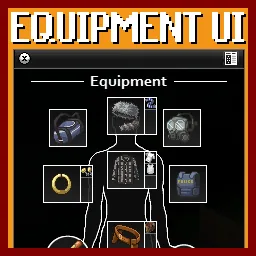
Equipment UI B42 adds a STALKER and Tarkov-style equipment interface to Project Zomboid. Manage clothing, armor and accessories through a customizable paper-doll window with drag-and-drop support. Features adjustable scaling, controller compatibility, optimized performance and multiplayer support. Includes a separate TETRIS-compatible version.
Contents
Equipment UI - Build 42 introduces a customizable equipment interface to Project Zomboid, inspired by inventory systems found in STALKER and Escape from Tarkov.
Instead of managing all equipped items through the standard inventory list, players receive a dedicated window displaying their character's clothing, armor, weapons and accessories in organized equipment slots.
This release is a maintained adaptation of Notloc's original Equipment UI, updated for Project Zomboid Build 42 with performance optimizations, interface improvements and additional customization.
The modification supports both single-player and multiplayer.
New Equipment Interface
The main feature is a paper-doll-style equipment window that makes managing wearable items easier.
Available functionality includes:
- Visual equipment slots for clothing and accessories.
- Drag-and-drop item management.
- Support for vanilla and modded BodyLocations.
- Visual feedback when equipment slots conflict.
- Adjustable window size and position.
- Optional integration with TwisTonFire Clothing BodyLocations.
- Keyboard and controller support.
The equipment panel can remain attached to the standard inventory or be detached and positioned elsewhere on the screen.
Its layout and position are saved between sessions.
Interface Customization
The updated version includes several options for adjusting the interface to your preferences.
| Setting | Function |
|---|---|
| UI Scale | Resize the interface from 0.5x to 4.0x |
| Hide Equipped Items | Remove equipped gear from the regular inventory list |
| Hide Equipment Hotbar | Hide the additional hotbar |
| Lock Window Resizing | Prevent accidental resizing of detached windows |
| Controller Binding | Configure controller interaction |
Larger equipment icons are also supported without overflowing their slots.
Improved Toggle Button
The button used to show or hide the equipment panel has received several fixes.
It now:
- Adjusts its position for different screen resolutions.
- Hides automatically when the inventory is collapsed.
- Reappears when the inventory is expanded.
- Remains within the visible screen area.
- Avoids creating duplicate buttons.
Custom keyboard shortcuts continue to function even when the regular inventory is hidden.
Two Versions - Which One Should You Install?
The Workshop release includes two versions with identical features, but different Mod IDs.
| Version | Mod ID | Recommended For |
|---|---|---|
| Equipment UI - Standalone | EQUIPMENT_UI_B42 |
Most players |
| Equipment UI - Standalone for TETRIS | EQUIPMENT_UI |
TETRIS and legacy dependencies |
Standard Version
Equipment UI - Standalone is recommended for most players.
It uses the updated Mod ID and does not require the original modification.
TETRIS Compatibility Version
Some addons, including TETRIS, expect the original EQUIPMENT_UI identifier.
For these setups, use Equipment UI - Standalone for TETRIS instead.
Never enable both versions simultaneously.
Important Installation Warning
If you choose the TETRIS-compatible version, first unsubscribe from Notloc's original Equipment UI.
The original release and the compatibility version share the same Mod ID and overlapping Lua files.
Keeping both installed can cause:
- Multiplayer Lua checksum errors.
- Different script versions between server and client.
- Load-order conflicts.
- Dependency problems.
All players and the server must use the same Equipment UI Workshop setup.
Performance and Compatibility
The Build 42 adaptation includes optimizations for clothing, equipment and hotbar updates.
It also improves icon scaling, window positioning and handling of inventory panels that have been moved or recreated.
| Feature | Status |
|---|---|
| Build 42 | Supported |
| Single-player | Supported |
| Multiplayer | Supported |
| Drag-and-drop equipment | Supported |
| Modded BodyLocations | Supported |
| Controller | Supported |
| TETRIS | Separate compatibility version |
| Original Equipment UI | Not required |
Outdated clothing addons, invalid item icons or incorrect BodyLocation definitions may still cause interface errors.
If problems occur, check for conflicting equipment interface modifications and incompatible clothing addons.
Localization
Available languages include English, Russian, Ukrainian, German, French, Spanish, Japanese, Korean, Polish, Turkish, Thai, Czech, Brazilian Portuguese, Simplified Chinese and Traditional Chinese.
Equipment UI B42 offers a more visual and convenient way to manage survivor equipment while preserving the game's existing inventory mechanics. Its adjustable layout, broad clothing support and dedicated compatibility version make it suitable for both ordinary survival playthroughs and heavily modded setups.
Comments 0
No comments yet — be the first.
Log in or sign up to leave a comment.