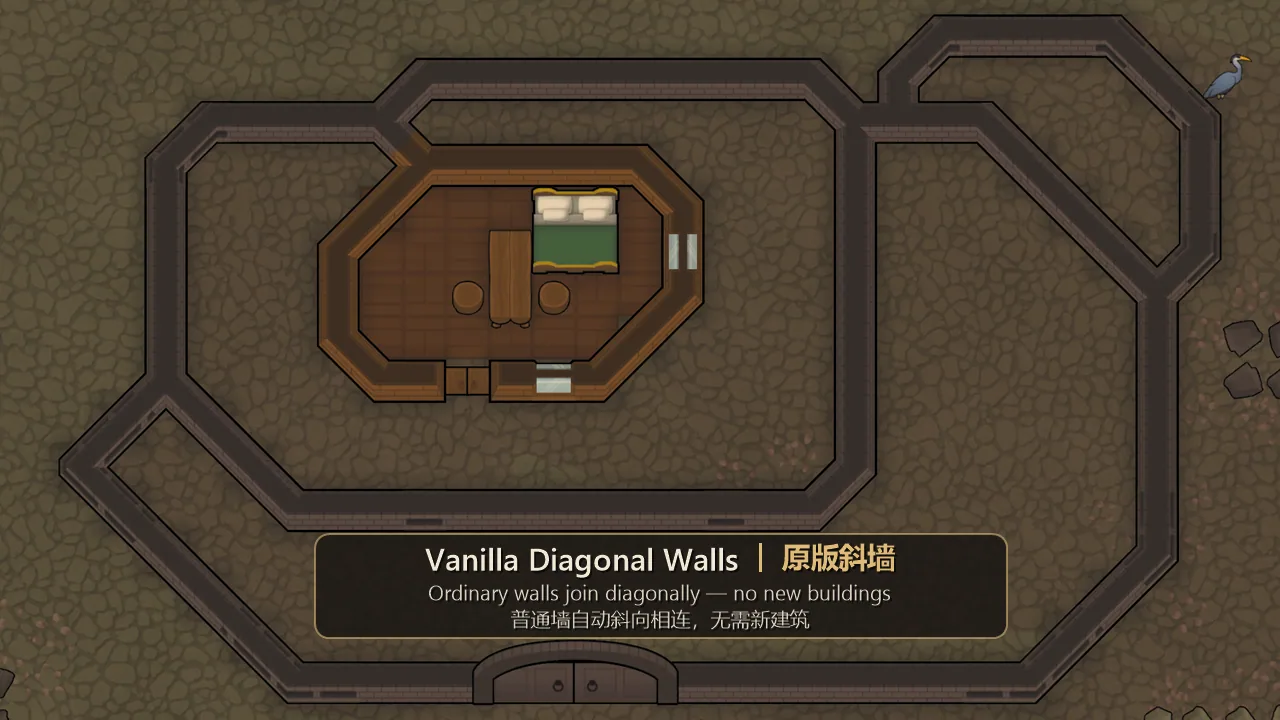

Vanilla Diagonal Walls adds automatic diagonal connections between ordinary walls in RimWorld 1.6 and 1.7, with 3D support in IsoRim Waylith. Works with different wall materials, ReBuild textures, embrasures and compatible modded walls. No new buildings or construction menus are needed. Includes beveled intersections, a No diagonal order and seamless visual integration without changing room mechanics or pathfinding.
Contents
Vanilla Diagonal Walls - Natural Diagonal Wall Connections for RimWorld
Vanilla Diagonal Walls improves the appearance of colony architecture by allowing ordinary walls to connect diagonally, similar to the gravship hull introduced in RimWorld's Odyssey expansion.
The modification makes diagonal structures look more natural without introducing new buildings, construction categories or additional wall types.
It also supports 3D diagonal wall rendering in IsoRim Waylith, making it useful for players who prefer a three-dimensional view of their colonies.
Automatic Diagonal Wall Connections
The main feature is the automatic creation of diagonal connections between compatible walls.
Unlike mods that require dedicated diagonal wall pieces, this system works directly with existing structures.
Key features include:
- Automatic diagonal connections - Walls that touch diagonally are visually joined.
- Support for different materials - Works with walls made from any standard building material.
- Square room corners - Ordinary corners retain their original shape.
- Furniture compatibility - Furniture positioned between two walls does not prevent a diagonal connection.
- Structural restrictions - Doors and other walls can block diagonal joins.
- Beveled intersections - When two diagonals meet, their pointed intersection receives a beveled finish.
- 3D visualization - Diagonal walls are supported in IsoRim Waylith.
The result is a smoother architectural appearance without changing the underlying wall construction system.
Manual Control with No Diagonal
Not every diagonal connection is desirable, especially when creating complex buildings.
To disable a specific connection, use the No diagonal designation.
You can find it under:
Architect > Orders > No diagonal
Mark the affected walls or the gap between them to prevent the diagonal connection from appearing.
This allows players to control the visual appearance of individual structures without changing global settings.
Visual Changes Only
Vanilla Diagonal Walls is designed as a purely visual modification.
It does not change:
- Pawn pathfinding.
- Room detection or room boundaries.
- Existing wall construction mechanics.
There are no additional configuration settings.
The mod can be safely added to or removed from an existing save.
Compatibility with Other Mods
The modification supports a variety of existing wall systems, including:
- ReBuild: Doors and Corners - Compatible wall textures and structures.
- Embrasures - Support for compatible embrasure walls.
- Modded Walls - Walls that connect using the same rules as vanilla structures.
- IsoRim Waylith - Three-dimensional diagonal wall visualization.
Walls already rendered diagonally by ReBuild are left to that modification.
Odyssey gravship hulls retain their original diagonal connections, while natural rock remains unchanged.
Requirements
- RimWorld 1.6 or 1.7
- Harmony
Information for Mod Developers
Modders can assign custom diagonal textures to their walls by adding the following extension to the wall's modExtensions:
<li Class="DiagonalWalls.DiagonalWallExtension">
  <texPath>Your/Texture</texPath>
</li>
Texture Requirements
- Use a seamless 2×2-cell texture representing a diagonal wall in the
/direction. - The wall's center line should run from the bottom-left to the top-right corner.
- The diagonal should be approximately one cell wide, repeating every two cells.
- Diagonals in the
\direction use a mirrored version of the same texture. - The wall's original shader and material color are applied automatically.
- Grayscale textures are recommended for consistent material coloring.
- Straight wall ends retain their automatically generated appearance.
These options allow developers to integrate custom wall textures into the diagonal rendering system without introducing separate construction objects.
Comments 0
No comments yet — be the first.
Log in or sign up to leave a comment.