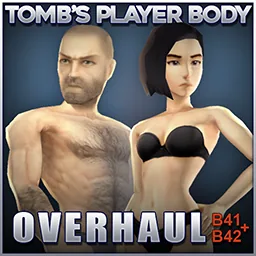

Tomb's Player Body Overhaul replaces character models in Project Zomboid with more detailed male and female bodies while preserving the vanilla art style. Includes three optional texture variants, 9 additional heads per gender and integration with Spongie's Character Customisation. Supports Build 41 and Build 42.20+, existing saves and multiplayer. Requires activation in the main menu and a game restart.
Contents
Tomb's Player Body Overhaul - Improved Character Models for Project Zomboid
Tomb's Player Body Overhaul replaces the original male and female character models in Project Zomboid with more detailed versions while preserving the game's Vanilla+ visual style.
The mod supports Build 41 and Build 42.20+ Stable and integrates with Spongie's Character Customisation.
Main Features
- Improved male and female body models with higher polygon density.
- Three optional body texture variants.
- Additional facial customization through Spongie's Character Customisation.
- 9 additional heads for each gender, providing 10 appearances per gender in total.
- Support for existing saves and multiplayer.
- Optional compatibility patches for clothing clipping issues.
The new body models also apply to zombies.
Included Modules
| Module | Description |
|---|---|
| Body | Main character models without bundled body textures |
| Textures | Default textures with underwear |
| Textures DOLL | Smooth, doll-like textures without anatomical details, intended for in-game underwear |
| Textures NUDE | Alternative body textures with additional anatomical details |
| Customisation | 9 additional male and female heads for Spongie's customization menu |
Choose only one texture module. The main Body module can also be used with vanilla or compatible custom textures.
Installation
- Enable the required modules in the main menu mod list.
- If using Spongie's Character Customisation, load all Tomb's modules after it.
- Select only one texture variant.
- Set Max Texture Size to at least 512 for higher-quality textures.
- Restart Project Zomboid to apply the new models.
Body replacements load during game startup and will not activate correctly without restarting.
For existing saves, enable the modules both in the main menu and in the save's mod configuration.
Multiplayer
Body models are loaded locally on each player's computer.
- Every player must enable the body and texture modules before joining a server.
- Server installation alone does not activate the new models.
- If other server mods require Tomb's Player Body, the necessary modules must also be enabled on the server.
Compatibility
- Spongie's Character Customisation - Integrated character customization.
- Tomb's Wardrobe: Alternative - Companion clothing collection.
- Goth Skin - Optional appearance addon.
- Compatibility patches - Available separately for minor clothing clipping issues.
If character models become deformed, check for conflicts with PZ_Optimization.
Performance and Important Notes
The replacement bodies use more polygons than vanilla models, and optional textures can have higher resolutions. Because the changes also affect zombies, performance may decrease on some systems.
The mod is safe to add to existing saves, but backing up your save is recommended.
Tomb's Player Body Overhaul improves character detail while retaining the recognizable visual identity of Project Zomboid.
Comments 0
No comments yet — be the first.
Log in or sign up to leave a comment.