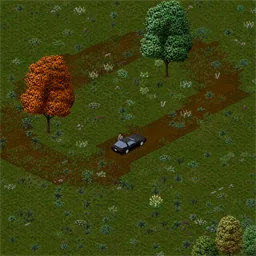

Project Dirtroad adds realistic dirt roads and natural walking paths to Project Zomboid Build 42.21. Repeated vehicle and foot traffic gradually wears down grass, creates visible trails and clears vegetation. Roads can disappear when abandoned or remain maintained through regular use. Customize erosion, vehicle damage, zombie traffic and animal movement. Supports singleplayer and multiplayer.
Contents
Project Dirtroad is a realistic terrain modification for Project Zomboid that allows roads and walking paths to form naturally through repeated use. Instead of manually constructing every dirt road, players can gradually create permanent-looking trails simply by driving vehicles or walking along the same routes.
The mod introduces a dynamic ground wear system that reacts to traffic, damages vegetation, prevents unwanted regrowth, and gradually restores abandoned paths to their original appearance.
This creates a more natural environment where the landscape changes according to how survivors actually use it.
Dynamic Dirt Roads and Natural Walking Paths
The main feature of Project Dirtroad is its ability to generate desire paths, informal trails that form when people repeatedly travel along the same route.
In Project Zomboid, this mechanic allows regularly used roads and paths to appear naturally over time.
Main features include:
- Vehicle-generated roads: Driving repeatedly across natural terrain gradually creates dirt tracks.
- Walking paths: Survivors form visible trails by regularly traveling along the same route.
- Persistent terrain wear: Frequently used routes maintain their worn appearance.
- Natural vegetation control: Established paths can suppress new bushes, saplings, and grass regrowth.
- Gradual erosion: Abandoned routes slowly disappear when no longer used.
- Optional zombie and animal traffic: Additional creatures can contribute to path formation.
The system makes roads reflect the movement patterns of survivors rather than requiring players to place road tiles manually.
Vehicle Traffic and Vegetation Damage
Project Dirtroad also changes how vehicles interact with bushes and small plants.
When cars drive directly through vegetation, they can progressively damage and eventually destroy it.
Vehicle interaction features:
- Bushes and small saplings can be damaged by passing vehicles.
- The first vehicle hit damages a bush or sapling.
- A second hit destroys the affected vegetation.
- Tall grass and weeds can optionally be cleared in the same way.
- Vehicles must reach a minimum speed before they can create wear or damage vegetation.
The default minimum speed is 2 km/h.
Clearing tall grass is disabled by default because it makes vehicles more destructive, although it can create cleaner-looking roads and remove the sound of driving through grass.
This option affects actual vegetation objects, not the transformation of grassy ground tiles into dirt.
How Fast Do Dirt Roads Form?
The speed of path formation depends on the amount of traffic and the settings selected by the player.
With default settings:
- Vehicle traffic: A visible dirt path begins appearing after approximately 6 passes over the same location.
- Foot traffic: A visible walking path begins appearing after approximately 60 passes over the same location.
The mod allows players to adjust how quickly terrain changes.
Vehicle Wear Rate examples:
| Setting | Passes for a visible path |
|---|---|
| 0.5 | 12 |
| 1.0 (default) | 6 |
| 2.0 | 3 |
Foot Wear Rate examples:
| Setting | Passes for a visible path |
|---|---|
| 0.5 | 120 |
| 1.0 (default) | 60 |
| 2.0 | 30 |
Higher values make roads form faster, while lower values require more repeated movement.
The vehicle and foot wear settings range from 0.01 to 100.0.
Natural Road Erosion and Abandoned Routes
One of the most interesting features of Project Dirtroad is that roads do not necessarily remain visible forever.
When an area is no longer used, the ground gradually recovers and the dirt path begins to fade.
Road disappearance depends on the Wear Erosion setting.
| Erosion Rate | Early Path Layer | Fully Developed Route |
|---|---|---|
| 0.25 | 120 days | 600 days |
| 0.5 | 60 days | 300 days |
| 1.0 (default) | 30 days | 150 days |
| 2.0 | 15 days | 75 days |
| 5.0 | 6 days | 30 days |
| 10.0 | 3 days | 15 days |
| 100.0 | 0.3 days | 1.5 days |
All values represent in-game days without additional traffic.
At the default erosion rate, a fully developed road can take approximately 150 in-game days to disappear completely if nobody uses it.
Setting Wear Erosion to 0 disables natural decay.
Any renewed traffic adds wear, helping maintain or rebuild existing routes.
Zombie and Animal Traffic
Project Dirtroad can also track the movement of zombies and animals.
These features are optional and disabled by default.
Available traffic sources:
- Vehicles: Enabled by default.
- Players: Enabled by default.
- Zombies: Disabled by default.
- Animals: Disabled by default.
When enabled, zombie and animal movement contributes to foot traffic wear.
This allows players to create a world where trails develop not only from human activity but also from the movement of other creatures.
Customizable Sandbox Settings
Project Dirtroad includes extensive settings for adjusting terrain wear and performance.
Available options include:
- Enable Vehicle Traffic: Track vehicles and allow them to create dirt roads.
- Enable Player Foot Traffic: Allow survivors to form walking paths.
- Enable Zombie Traffic: Include zombie movement in terrain wear calculations.
- Enable Animal Traffic: Include animal movement.
- Vehicle Wear Rate: Adjust how quickly vehicles create roads.
- Foot Wear Rate: Control how quickly walking paths develop.
- Wear Erosion: Change how quickly abandoned routes fade.
- Vehicles Clear Bushes and Saplings: Allow vehicles to damage and destroy smaller vegetation.
- Vehicles Clear Grass: Optionally remove tall grass and weeds through vehicle traffic.
- Minimum Vehicle Speed: Set the minimum speed required for terrain wear.
- Overlay Sand: Allow generated paths to appear over sandy terrain.
- Vehicle Sampling Frequency: Adjust how frequently vehicle movement is tracked.
Additional options are available for debugging and managing existing paths.
Invisible Paths
The Invisible Paths setting hides the visual appearance of generated roads without deleting their underlying data.
Traffic tracking, terrain wear, erosion, and configured vegetation-clearing features continue to operate.
When the option is disabled again, existing paths become visible.
Cleanup / Uninstall Mode
Cleanup / Uninstall Mode is designed for players who want to remove Project Dirtroad from an existing world.
When enabled, it gradually disables the mod's features and removes its generated path graphics and stored data from areas that are visited or processed.
The cleanup is not instantaneous, especially on large multiplayer servers.
After cleanup, paths must form again if the mod is reactivated.
Performance and Multiplayer Support
Project Dirtroad supports both singleplayer and multiplayer, including dedicated servers.
The mod includes a configurable vehicle sampling system to balance accuracy and performance.
Vehicle Sampling Frequency examples:
1.0- Check vehicle movement every 10 ticks.2.0- Check every 5 ticks.10.0- Check every tick.
Increasing the sampling frequency can improve vehicle tracking at higher speeds, particularly on servers with lower tick rates.
However, more frequent checks require additional server processing power.
For most singleplayer games, the default setting is generally sufficient.
Compatibility and Save Safety
Project Dirtroad requires Project Zomboid Build 42.21 or newer within the supported Build 42 series.
Compatibility information:
- Build 42.21: Required minimum game version.
- Singleplayer: Supported.
- Multiplayer: Supported.
- Existing saves: The mod can be added to ongoing games.
- Existing servers: Supported, although backups are recommended.
- Visual assets: Uses vanilla sprites and tiles.
- Save data: Stores additional mod data and generates sprite attachments.
Important: Removing the mod directly is not recommended because generated paths may remain in the world.
Before uninstalling, enable Cleanup / Uninstall Mode and allow the mod to clean affected areas.
Always back up important saves before adding or removing modifications that change the world.
Comments 0
No comments yet — be the first.
Log in or sign up to leave a comment.