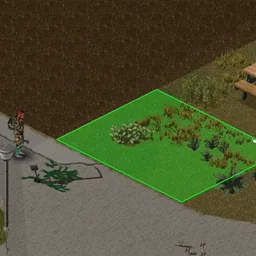

Area Tasks adds convenient area-based automation to Project Zomboid Build 42.21. Select a zone and let your survivor perform repetitive tasks, including farming, harvesting, cleaning, dismantling furniture, moving items, chopping trees and transporting corpses. Uses vanilla animations, tools and stamina mechanics. Supports multiplayer, customizable settings and existing saves.
Contents
- Automate Repetitive Tasks Across an Area
- How to Use Area Tasks
- Farming and Gardening Automation
- Automatically Cut Down Trees and Clear Vegetation
- Move Items Between Containers, Vehicles and Bags
- Move and Dispose of Zombie Corpses
- Barricading and Securing Your Base
- Animal Care and Resource Collection
- Cleaning, Shoveling and Furniture Dismantling
- Sandbox Settings and Customization
- Multiplayer and Mod Compatibility
- A More Convenient Way to Manage Your Survivor Base
Area Tasks is a powerful quality-of-life and automation mod for Project Zomboid Build 42.21 that allows players to perform repetitive activities across entire selected areas instead of interacting with every object individually.
Whether you need to harvest a large farm, clear vegetation around your base, dismantle furniture, organize storage containers, or remove zombie corpses, Area Tasks makes these activities much more convenient.
Simply select an action, highlight the desired area, and your survivor will automatically visit eligible targets and perform the corresponding tasks.
Unlike instant-action automation mods, Area Tasks uses Project Zomboid's original gameplay mechanics. Your character still walks between objects, performs animations, uses tools, consumes stamina, and follows normal inventory restrictions.
Automate Repetitive Tasks Across an Area
The main feature of Area Tasks is its ability to organize multiple ordinary actions into a single task queue.
Instead of manually selecting every object, you can designate an entire area for processing.
Main features include:
- Area selection: Mark a rectangular zone containing multiple targets.
- Automatic task queues: Your survivor visits eligible objects and performs the selected action.
- Vanilla gameplay mechanics: Uses normal pathfinding, animations, tools, and stamina.
- Farming automation: Prepare soil, plant seeds, water crops, and harvest produce.
- Vegetation clearing: Remove grass, bushes, trees, roots, and other obstacles.
- Inventory management: Transfer items between containers, vehicles, bags, and the ground.
- Base maintenance: Clean surfaces, remove graffiti, and dismantle furniture.
- Zombie corpse disposal: Move bodies to storage, vehicles, designated areas, or through windows.
- Multiplayer support: Tested in both singleplayer and multiplayer on Build 42.21.
The mod coordinates existing gameplay actions rather than introducing instant harvesting, teleportation, or free resource collection.
How to Use Area Tasks
Area Tasks integrates directly into Project Zomboid's world interaction menu.
Basic instructions:
- Right-click anywhere in the game world.
- Open the Area Tasks submenu.
- Choose the activity you want to automate.
- Select a source or drag a green rectangle over the desired area.
- Your character begins visiting eligible targets and performing the corresponding actions.
For example, you can select an entire field and queue the harvesting of every eligible crop inside it.
Your survivor will walk between plants and use the normal harvesting actions.
Important: Tasks are not guaranteed to finish if your character lacks the required tools, becomes exhausted, cannot reach a target, or encounters another interruption.
Area Tasks respects these limitations instead of bypassing them.
Farming and Gardening Automation
One of the most useful applications of Area Tasks is automating everyday agricultural work.
The modification supports numerous gardening and farming activities.
Gardening tasks include:
- Scythe Grass: Cut grass using a scythe.
- Remove Grass: Clear unwanted grass.
- Dig Furrow: Prepare furrows for planting.
- Remove Bush: Remove bushes.
- Remove Wall Vine: Clear climbing vegetation from walls.
- Remove Stump: Remove tree stumps.
- Remove Stones: Clear stones of different sizes and types.
- Remove Wood: Collect or remove twigs, branches, and logs.
For farming plots, additional tasks are available.
Plowed Land actions include:
- Sow: Plant seeds carried by the character.
- Add Fertilizer: Apply fertilizer.
- Add Compost: Add compost to crops.
- Treat Problem: Treat mildew, pest flies, slugs, snails, and aphids.
- Harvest: Harvest eligible crops.
- Water: Water planted crops.
- Remove: Remove planted crops or relevant farming objects.
This makes managing larger farms significantly easier without changing the underlying farming mechanics.
Automatically Cut Down Trees and Clear Vegetation
Area Tasks also simplifies clearing land for construction or maintaining paths around your settlement.
Players can select an area containing trees and queue the Cut down Tree action.
The mod automatically looks for suitable axes in the character's inventory, including carried bags.
Tree-cutting features:
- Selects a suitable axe based on its damage.
- Attempts to use the most effective available axe.
- Replaces broken axes during the task when another suitable tool is available.
- Uses normal tree-cutting actions and animations.
For Scythe Grass, the mod prefers a full-sized scythe over a hand scythe when both are available.
These features reduce repetitive equipment selection while preserving normal tool usage and durability.
Move Items Between Containers, Vehicles and Bags
Area Tasks introduces an expanded Move Items system for organizing loot and storage.
Instead of manually transferring supplies between dozens of containers, players can designate sources and destinations.
Available locations include:
- Ground tiles.
- Individual storage containers.
- Groups of containers within a selected area.
- Individual vehicle storage compartments.
- Multiple vehicle storage areas.
- Bags carried by the character.
How Item Transfers Work
- Select Area Tasks > Move Items.
- Choose the source of the items.
- Select the destination.
- The character begins collecting and delivering eligible items.
Single selection targets an individual container or vehicle storage area.
Area selection uses a rectangle to include multiple containers or vehicle compartments.
The mod can make several trips when there are more items than the character can carry at once.
Additional transfer behavior:
- Favorite items are left behind when collecting from containers or vehicles.
- Items that should not be transferred remain at their source.
- Multiple destination containers can be filled in sequence.
- Stacked containers on selected tiles are included.
- Bag destinations transfer items directly into the chosen carried bag.
- Items that cannot be delivered may remain in the character's inventory.
- Excess items may be dropped beside a container when necessary.
When selecting vehicle storage areas, draw the rectangle over the highlighted storage zones and open the relevant vehicle doors first.
Move and Dispose of Zombie Corpses
Area Tasks makes cleaning up large numbers of zombie bodies more manageable.
Instead of carrying each corpse individually through repeated manual interactions, you can select an area containing bodies and choose how to dispose of them.
Available corpse management actions:
- To Ground: Move corpses to a chosen ground location.
- To Container: Transfer corpses into an appropriate container.
- To Vehicle: Move bodies into vehicle storage.
- To Trash and Empty: Use a dumpster and automatically empty it where the game allows this action.
- Throw Corpse Through Window: Throw bodies through open, unbarricaded windows.
The dumpster disposal option is available in singleplayer and on multiplayer servers that permit the relevant vanilla action.
These features are especially useful when cleaning up settlements after large zombie attacks.
Barricading and Securing Your Base
Area Tasks includes several actions for securing multiple windows and maintaining defensive structures.
Available security tasks include:
- Close windows.
- Add sheets to windows.
- Close curtains.
- Remove curtains.
- Pick up curtains.
- Barricade windows with wooden planks.
- Barricade using metal sheets.
- Barricade using metal bars.
- Remove barricades from the inside, outside, or both sides.
Configurable Plank Barricading
The mod includes an option for controlling how wooden barricades are installed.
Two modes are available:
- Fully Plank Windows: Adds up to four planks to each selected side of a window.
- One Plank Per Window: Adds one plank per selected side during each run.
The first option is enabled by default.
All barricading actions still require the appropriate tools and materials.
Animal Care and Resource Collection
Area Tasks also supports several activities involving animals.
Available actions include:
- Milk: Milk eligible animals.
- Shear: Shear animals.
- Pet: Interact with animals through petting.
- Add Bait: Place bait using a selected carried bait type.
- Butcher: Process eligible animals through the standard game action.
This allows survivors to coordinate repeated animal-related activities through a single selected area.
Cleaning, Shoveling and Furniture Dismantling
The mod includes additional tasks for general maintenance and resource collection.
Cleaning and maintenance:
- Pick up broken glass.
- Pick up trash.
- Clear ashes.
- Clean stains.
- Remove graffiti.
Shovel tasks:
- Collect dirt.
- Collect clay.
- Collect sand.
- Collect gravel.
- Pick up dung.
Automatic Furniture Dismantling
Area Tasks can automatically dismantle eligible furniture inside a selected area.
How it works:
- Furniture is processed starting with the nearest eligible object.
- The default limit is 10 furniture objects per task.
- The player must have the tools required by vanilla Project Zomboid.
- Storage containers must be empty before dismantling.
- Furniture with another furniture object placed on top is skipped.
- Multi-tile furniture must fit entirely inside the selected area.
For example, if a television is placed on a cabinet, dismantle or remove the television first, then select the area again to process the cabinet.
The maximum furniture limit can be configured through the mod's settings.
Sandbox Settings and Customization
Area Tasks provides extensive customization options.
In singleplayer, settings are available through:
Options > Mods > Area Tasks
Singleplayer preferences apply across different singleplayer worlds.
Multiplayer servers use their own Sandbox settings instead.
Main options include:
| Setting | Default | Available Configuration |
|---|---|---|
| Maximum Area Width | 25 tiles | 1-50 tiles |
| Maximum Area Height | 25 tiles | 1-50 tiles |
| Maximum Destination Distance | 50 tiles | 1-100 tiles |
| Maximum Furniture per Disassemble Task | 10 | 0-100 |
| Move Items Carry Limit | Maximum Carry | Maximum Carry / Avoid Overburden |
| Plank Behavior | Fully Plank Windows | Full barricade / One plank per run |
Setting the furniture dismantling limit to 0 disables and hides the corresponding action.
Inventory Carry Limits
The Move Items Carry Limit option controls how much weight the character may transport.
Maximum Carry uses the normal maximum carrying allowance.
Avoid Overburden limits collection according to the character's remaining unburdened capacity, including the weight of items already carried.
This can require more trips but helps avoid excessive carrying loads.
The setting applies to item transfer routes except those using a carried bag as the destination.
Time Speed and Context Menu Options
In singleplayer, Area Tasks can control how time speed behaves between queued actions.
By default, the mod maintains the current speed between actions and returns to normal speed when the task ends.
Other options allow normal speed-change behavior or maintaining speed after completion.
Manual speed changes, pausing, and other game-triggered adjustments still apply.
This feature does not affect multiplayer.
Players can also change the position of the Area Tasks submenu in the right-click context menu.
Multiplayer and Mod Compatibility
Area Tasks has been tested on Project Zomboid Build 42.21 in both singleplayer and multiplayer.
The mod can be safely added to or removed from existing saves, although making a backup before changing an important mod collection is recommended.
Additional compatibility features:
- Uses standard Project Zomboid actions.
- Respects normal tool and inventory requirements.
- Includes Russian and several other interface translations.
- Provides an API for integration with other mods.
- Requires no additional mod for its singleplayer settings.
Support for Other Modded Actions
Area Tasks includes an API that allows other mod developers to register their own compatible actions.
The included 42/API.md documentation describes action registration, tool requirements, selection rules, events, and task queue handling.
One example of this integration is Moats Area Task.
A More Convenient Way to Manage Your Survivor Base
Area Tasks is especially useful for players who maintain large farms, organize extensive storage facilities, regularly clear forests, or spend substantial time managing their settlements.
Instead of repeating dozens of nearly identical clicks, you can designate an area and allow your survivor to perform the work using the game's original mechanics.
The result is less repetitive micromanagement without removing the physical effort, resource consumption, or survival limitations that define Project Zomboid.
Comments 0
No comments yet — be the first.
Log in or sign up to leave a comment.