

O.C.D. Inventory improves inventory management in Project Zomboid Build 42 by adding a dedicated Equipped section for clothing, weapons, keyrings, and hotbar items. Organize your equipment, hide worn items from the main inventory, and equip or unequip gear using drag and drop. Compatible with CleanUI, Better Containers, Reorder Containers, and Proximity Inventory.
Contents
O.C.D. Inventory (Organized Containers & Displays) is an inventory interface improvement mod for Project Zomboid Build 42 that introduces a dedicated section for all equipped items. Instead of searching through your regular inventory to find clothing, weapons, bags, and attached equipment, you can access everything your character is currently wearing or carrying in one convenient location.
The modification adds an Equipped container above the standard inventory list, making equipment management faster and more organized without replacing the original Project Zomboid inventory system.
Equipped - A Separate Section for Your Gear
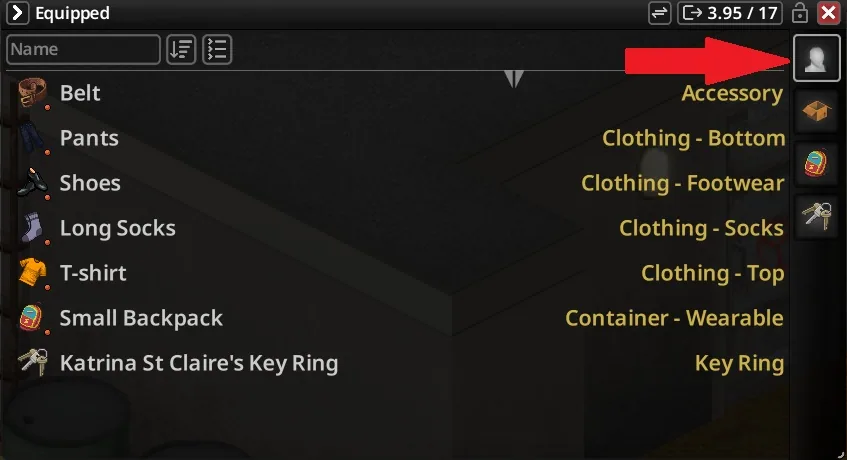
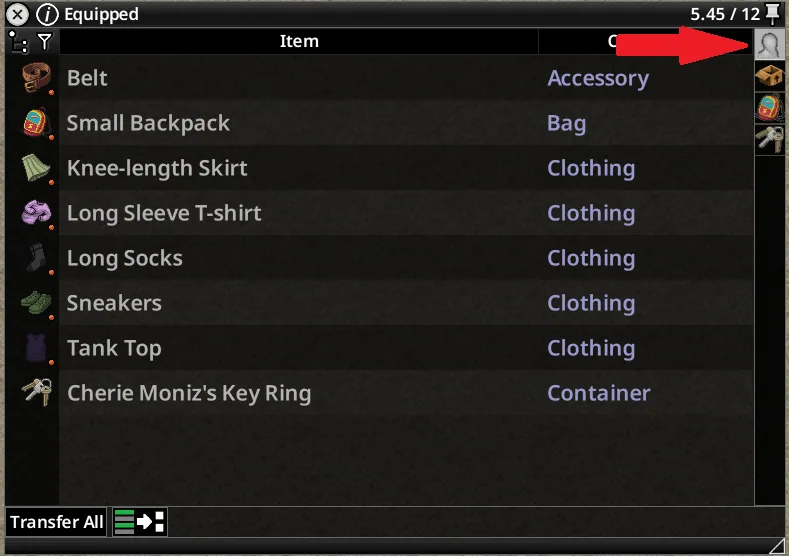
The main feature of O.C.D. Inventory is a new equipment container represented by a mannequin icon.
It appears above your regular inventory containers and provides an organized overview of items currently equipped by your survivor.
The Equipped section includes:
- Worn clothing: Jackets, shirts, pants, protective equipment, and other wearable items.
- Equipped weapons: Weapons and objects currently held in your character's hands.
- Wearable bags: Backpacks and other equipped bags.
- Keyrings: Keyrings carried by your survivor.
- Hotbar equipment: Items attached to the character's hotbar slots, including equipment carried on the back.
This makes it easier to distinguish between items stored in your inventory and those currently being used.
Hide Equipped Items from the Main Inventory
O.C.D. Inventory allows equipped items to appear exclusively in the new Equipped section instead of being duplicated in the ordinary inventory list.
This provides several advantages:
- Reduces visual clutter in your inventory.
- Separates carried items from currently equipped gear.
- Makes it easier to identify what your survivor is wearing.
- Keeps the regular inventory interface available.
- Simplifies equipment organization during exploration and looting.
The modification preserves the familiar Project Zomboid inventory system while adding a more convenient way to manage equipment.
Drag and Drop Equipment Management
Another important feature is the ability to equip and unequip items directly through drag and drop.
Supported interactions include:
- Equip clothing: Drag wearable clothing onto Equipped to put it on.
- Equip bags: Drag compatible wearable bags into Equipped.
- Equip weapons: Move weapons or handheld items into Equipped.
- Unequip items: Drag equipped clothing or handheld objects back into Inventory.
- Detach hotbar equipment: Drag attached items, including those carried on the back, into Inventory.
These interactions reduce the need to open additional menus when changing equipment.
Hotbar Shortcuts
O.C.D. Inventory preserves the standard hotbar functionality.
When you equip or put away an item, its assigned hotkey remains available as in vanilla Project Zomboid.
This allows players to organize their equipment without losing familiar keyboard shortcuts.
Compatibility with Inventory Interface Mods
O.C.D. Inventory is designed to work with several popular inventory interface modifications.
Supported modifications:
- Vanilla Build 42: Full functionality without additional interface mods.
- CleanUI: Supports dragging container icons to change the position of Equipped.
- Better Containers: Respects container reordering and locking.
- Reorder Containers: Respects container reordering and locking.
- Proximity Inventory: Fully compatible.
Recommended Load Order
When using CleanUI, place it before O.C.D. Inventory.
Example:
- CleanUI
- O.C.D. Inventory
If you use Better Containers or Reorder Containers, install only one of these two modifications alongside O.C.D. Inventory.
Supported combinations include:
- CleanUI + O.C.D. Inventory
- Better Containers + O.C.D. Inventory
- Reorder Containers + O.C.D. Inventory
- CleanUI + Better Containers + O.C.D. Inventory
- CleanUI + Reorder Containers + O.C.D. Inventory
Do not use Better Containers and Reorder Containers together.
Other combinations involving multiple container-reordering mods have not been fully tested and may cause conflicts.
Supported Versions and Updates
O.C.D. Inventory supports Project Zomboid Build 42.19.x and Build 42.21, with testing confirmed on Build 42.21.
Version 0.2.6 includes compatibility updates for newer CleanUI changes and additional stability improvements.
The mod is focused on inventory organization and equipment interaction, making it a useful addition for players who prefer a cleaner and more convenient interface.
Screenshots 2

Comments 0
No comments yet — be the first.
Log in or sign up to leave a comment.