
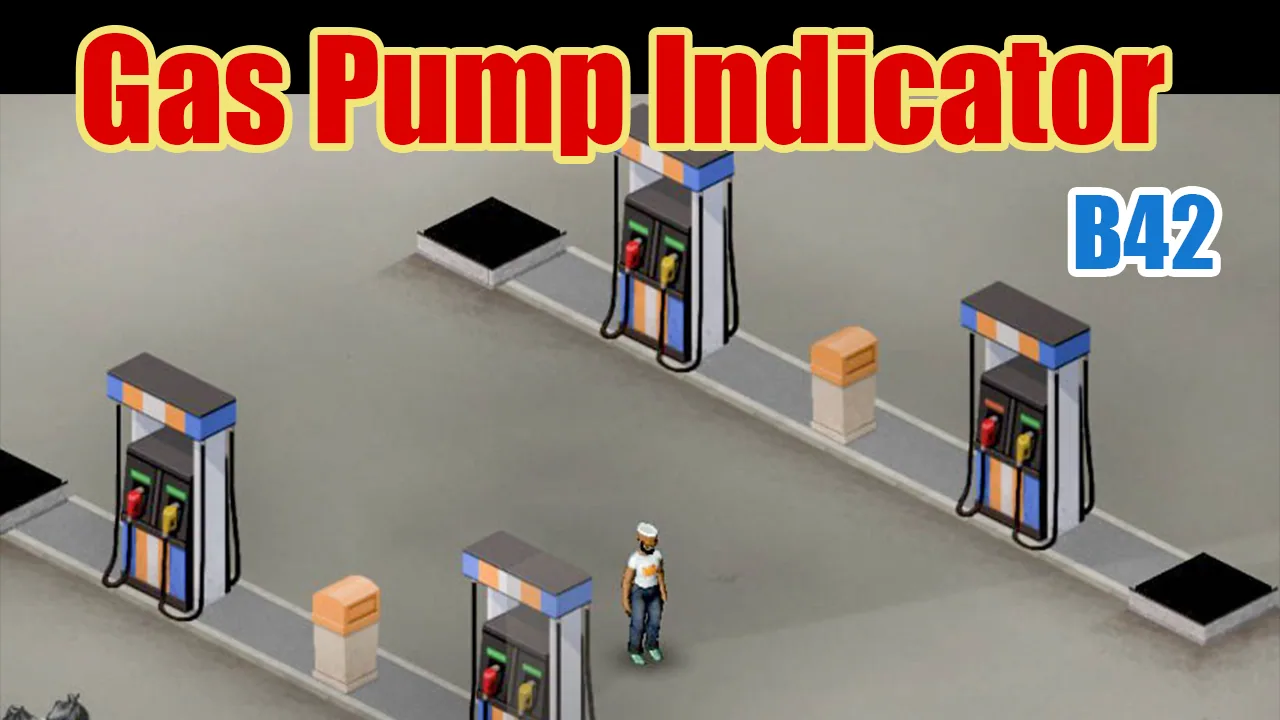
Gas Pump Indicator improves gas stations in Project Zomboid Build 42 with colored LED indicators showing fuel availability and power status. Green means fuel is available, red indicates an empty tank, and no light means no power. Enjoy glowing indicators at night, optional remaining fuel information, and full singleplayer and multiplayer support.
Contents
Gas Pump Indicator is a visual improvement mod for Project Zomboid Build 42 that makes checking gas station fuel pumps faster and more convenient. Instead of opening the interaction menu every time you want to check a pump, you can identify its fuel availability and power status by looking at a small colored LED indicator.
The modification recolors the existing LED slit above each fuel nozzle, preserving the original appearance of Project Zomboid's gas pumps while making their condition immediately recognizable.
Colored LED Indicators for Gas Pumps
The main feature of Gas Pump Indicator is a simple visual system that displays the current state of each fuel pump.
Three indicator states are available:
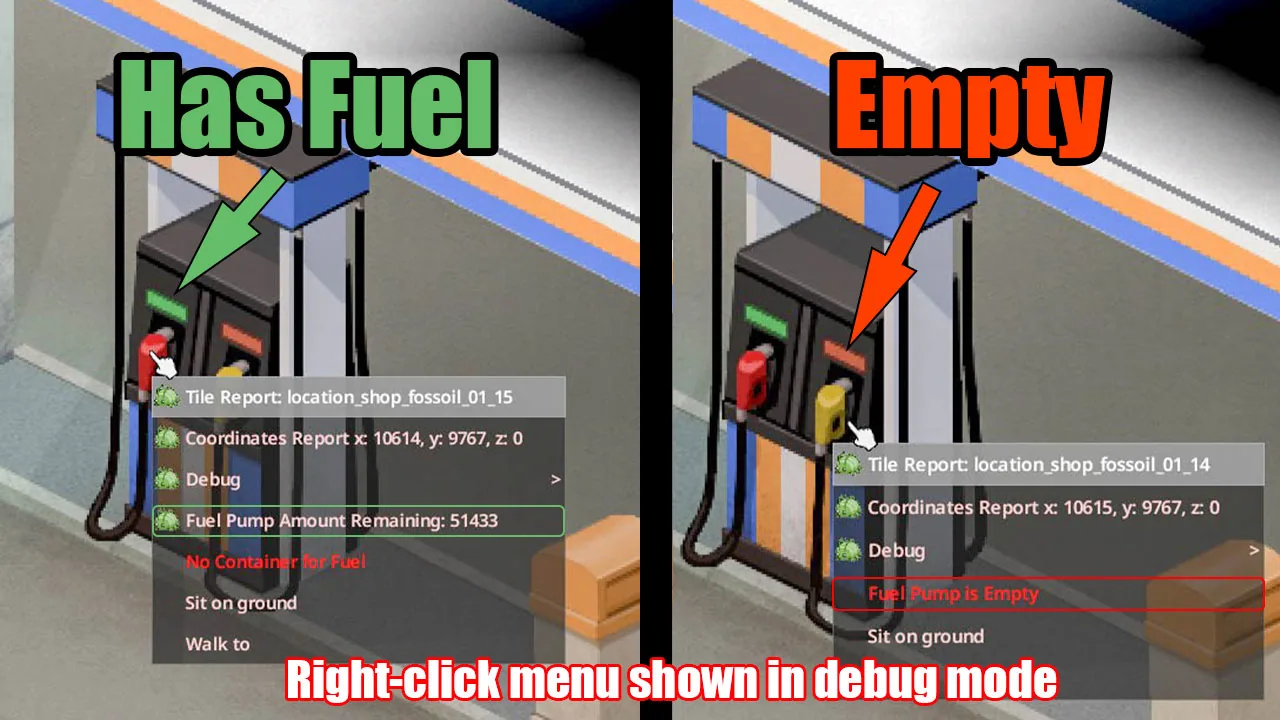
- Green LED: The pump has electricity and contains fuel.
- Red LED: The pump is powered, but its fuel tank is empty.
- No LED: The pump has no electrical power, or its fuel quantity has not yet been determined in certain multiplayer situations.
This makes it easier to identify working gas pumps without repeatedly opening their interaction menus.
The indicators work with both regular electrical grid power and player-connected generators.
Glowing Indicators at Night
Gas Pump Indicator also improves visibility during nighttime exploration.
When darkness falls, the LEDs emit a colored glow corresponding to their current state.
Nighttime features include:
- Green illumination for powered pumps containing fuel.
- Red illumination for powered pumps with empty tanks.
- No illumination when electrical power is unavailable.
- Automatic adaptation to daytime and nighttime lighting.
Unlike the standard white pump lighting introduced in Build 42.20, the mod uses colored indicators and also supports generator-powered pumps.
Remaining Fuel Information
The modification includes an optional feature that displays the amount of fuel remaining inside a gas pump.
When enabled, this information appears in the pump's right-click interaction menu.
How to enable the fuel readout:
- Open the world creation settings.
- Find the Gas Pump Indicator options in the Sandbox settings.
- Enable
Show remaining fuel in the right-click menu. - Create your world with the selected configuration.
The feature is disabled by default.
Enabling the Fuel Readout in an Existing Save
For an existing world, changing this setting requires developer mode.
- Close Project Zomboid.
- Add
-debugto the game's launch options. - Start the game and open the debug menu's Sandbox options.
- Enable the remaining fuel readout.
- Reload the world.
If a pump has no electrical power and its fuel quantity has not been determined, the readout will not appear.
The fuel readout is configured through Sandbox settings rather than Mod Options, allowing multiplayer hosts to manage it.
Original Game Visual Style
Gas Pump Indicator is designed to blend naturally with Project Zomboid's existing graphics.
Rather than adding large icons above pumps, the mod modifies the small LED slit already present on the original sprites.
Visual improvements include:
- Pixel-aligned indicators based on original gas pump artwork.
- Smooth color blending with the surrounding pump body.
- Independent indicators for left and right fuel nozzles.
- Support for both 1x and 2x sprite resolutions.
- No additional signs or oversized interface elements.
The mod supports all eight vanilla gas pump sprites, including Fossoil and Gas2Go pumps facing east or south.
Multiplayer Support and Generator Behavior
Gas Pump Indicator works in both singleplayer and multiplayer.
In multiplayer, the LED colors are rendered locally for each player. The mod does not change fuel amounts or transmit additional world-state information.
There is one multiplayer-specific limitation.
A powered gas pump may initially show no LED if the server has not yet determined its remaining fuel quantity.
To resolve this:
- Open the pump's right-click menu once, without needing to take fuel.
- Alternatively, leave the area and return.
Once the fuel amount has been determined, the indicator should display the appropriate color when the pump has electricity.
After connecting or activating a generator, the LED may take a few seconds to update. Zooming in or out can make the indicator refresh immediately.
Compatibility and Requirements
Gas Pump Indicator supports Project Zomboid Build 42 and does not require any additional modifications.
Compatibility information:
- Build 42: Supported.
- Singleplayer: Supported.
- Multiplayer: Supported, including co-op hosting.
- Additional dependencies: None.
- Existing saves: Safe to install or remove.
- Gameplay mechanics: No changes to fuel quantities, world state, recipes, or scripts.
The modification affects only visual rendering and optional user interface information.
Screenshots 2


Comments 0
No comments yet — be the first.
Log in or sign up to leave a comment.