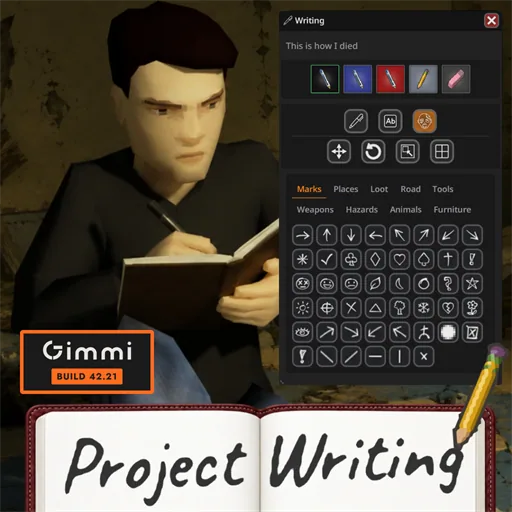

Write on illustrated notebook pages and draw directly on maps. Project Writing adds handwritten text, expanded journals, freehand annotations and multiplayer sharing, using the pens and pencils you carry. Supports Build 42.20+ with no required dependencies.
Contents
Project Writing replaces the plain writing interface with paper suited to the item you are holding. Notes use the game’s handwritten font, aligned with printed lines, while notebooks and journals open as two-page spreads without text crossing the fold.
Notebooks and journals
Writable items receive their own paper presentation, with expanded page counts:
- Notepads: 20 pages.
- Notebooks: 30 pages.
- Journals: 80 pages.
Writing saves automatically, and reopening an item returns you to the last page you wrote on.
The toolbar reflects your actual writing tools. You need a suitable pen or pencil, ink retains its color, and pencils can erase with their rubber. Pens from other mods are supported.
Draw and annotate maps
Use freehand drawing, notes and symbols on both the world map and paper maps. Move, rotate, resize or erase annotations, with Ctrl+Z available to undo changes.
Additional tools include:
- Flat placement of notes and symbols on the isometric map.
- Manual night mode or automatic switching with the world’s clock.
- Cutting out an area of the world map to create a physical map you can give to someone.
- 141 additional symbols, organized by category.
ExtraMapSymbols and Add More Map Symbols are included.
Multiplayer sharing
Choose whether drawings are visible only to you, your faction, your safehouse, selected players or everyone. The selection applies to subsequent drawing, subject to server permissions. Sharing can also be disabled.
Written content travels with its item in multiplayer. Dedicated servers need the mod installed too.
Reading and settings
Flyers, newspapers and printed maps open in a Neat-style reading panel, with a text transcription available separately.
Under Options > Mods > Project Writing, configure pausing, the vanilla map, sharing and symbol packs. Sandbox settings can disable freehand drawing or give every player the vanilla map. Resize the panel by dragging its corner.
Compatibility
Supports Build 42.20 and later and all 26 game languages. No dependencies are required.
NeatUI Framework is optional and supplies its widgets when installed. The mod also works with Center Map and is designed to match the other Neat mods.
Comments 0
No comments yet — be the first.
Log in or sign up to leave a comment.