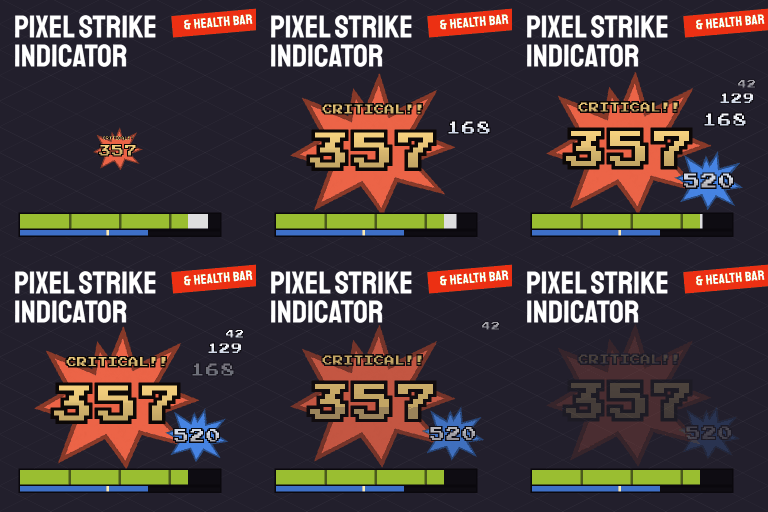

See floating damage numbers, critical-hit alerts, wound notifications and configurable health bars. Track zombies, animals, vehicles and your survivor without changing combat mechanics. Includes partial Project Viewpoint support and multiplayer, with server installation required.
Contents
Pixel Strike Indicator adds visual combat feedback through floating numbers, hit notifications and health bars. Numbers rise and fade, while repeated hits on the same zombie stack together.
The mod changes only the interface, without adding items, recipes or loot.
Damage and hit notifications
Colors distinguish different events:
- White: damage dealt, moving right.
- Red: damage received, moving left.
- Green: health recovered.
- Orange: zombie fire damage, disabled by default.
- Pale steel blue: damage to structures, furniture and trees, disabled by default.
- Violet and cyan: nearby vehicle-part and window damage, disabled by default.
All colors are configurable, with defaults designed to remain distinguishable for red-green color blindness.
Special attacks receive larger numbers, a star and a label: CRITICAL!!, HEADSHOT!!, INSTAKILL!! and BOOM!!. Each element can be toggled separately. Ordinary damage numbers can be hidden while retaining special-hit feedback.
Additional indicators show missed swings, bites, scratches and lacerations. Successful bullet hits display a marker at the cursor.
Choose between weapon damage multiplied by 100 and actual health lost.
Configurable health bars
Separate settings control bars for zombies, animals, vehicles and your character. Zombie bars default to appearing only when hurt; vehicle bars start disabled.
A white segment highlights the latest damage, while a thin secondary zombie bar indicates toughness. Your own bar represents body health from 0 to 100 and can stay near the character or occupy one of six screen-edge positions.
Settings include placement, numeric health, segmented display, dimensions and 10 color palettes. With NPC mods, hostile and friendly characters receive red and blue frames.
Bars respect walls and, by default, lighting. Hold right-click on a zombie to display its bar individually.
Partial Project Viewpoint support
In first- and third-person views, damage numbers appear around the crosshair, with one temporary bar for the last target, rather than separate bars for every zombie.
Received damage, healing and wounds appear lower on screen. Pinned bars and the hit marker remain available. Fire, vehicle and explosion numbers are hidden in first person.
Multiplayer and saves
The server must install and enable the mod. Client-only installation has no effect on a server.
Safe to add to or remove from an existing save.
Comments 0
No comments yet — be the first.
Log in or sign up to leave a comment.