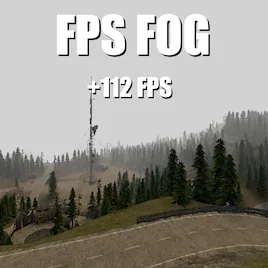

Boost your server’s performance and frame rates with this specialized fog modification that implements true distance culling. Unlike standard visual fog effects which merely obscure distant objects while still rendering them, this addon actively prevents the engine from processing entities and geometry hidden within the dense mist. By stopping the rendering of items beyond the fog line, it significantly reduces the load on both the CPU and GPU, offering a smoother experience similar to the chun
The core benefit of this system is efficiency. In default Garry's Mod settings, the fog editor changes visibility but does not stop the game from calculating physics and drawing models for objects that are technically invisible to the player. This addon bridges that gap, ensuring that if you can’t see it, the computer doesn’t waste resources drawing it. The result is a noticeable increase in FPS, particularly for players with mid-range hardware or when exploring vast outdoor environments. It transforms fog from a purely atmospheric tool into a practical performance utility without sacrificing the visual mood of your map.
Host-Exclusive Configuration and Control
To maintain stability and prevent conflicting visual settings across the server, only the host or server administrator has the privilege to modify the fog parameters. This restriction ensures that the culling distance remains consistent for all connected clients, avoiding synchronization issues or sudden pops in object visibility. The host can adjust the density and range of the fog to balance between maximum performance and desired atmospheric depth. This centralized control makes it easier for admins to tailor the experience to the specific needs of their map, whether they are running a tight indoor roleplay scenario or an expansive open-world survival mode.
For players, this means a "set and forget" experience. Once the host configures the optimal settings, everyone benefits from the improved performance automatically. There is no need for individual clients to tweak their own video settings or console commands to achieve these gains. The addon works seamlessly in the background, handling the complex task of determining which entities fall outside the visible range and excluding them from the render queue. This automation makes it an ideal solution for public servers where user technical knowledge varies widely.
Installation and Technical Benefits
Installing the Optimized Fog Culling addon is straightforward via the Steam Workshop or by manually placing files in the garrysmod/addons directory. It requires no additional dependencies and integrates directly with the Source engine’s existing fog systems. Because it operates on a fundamental level of rendering logic, it is compatible with most other visual mods, provided they do not attempt to override the core fog distance calculations.
This modification is particularly valuable for server owners looking to maximize player capacity without sacrificing smoothness. By reducing the number of active entities being rendered at any given time, the server can handle more complex physics interactions and AI routines elsewhere. Whether you are hosting a competitive gamemode or a creative building hub, this tool offers a simple yet powerful way to enhance technical performance. Embrace the efficiency of true fog culling and give your players the fluid, lag-free experience they deserve.
Comments 0
No comments yet — be the first.
Log in or sign up to leave a comment.