









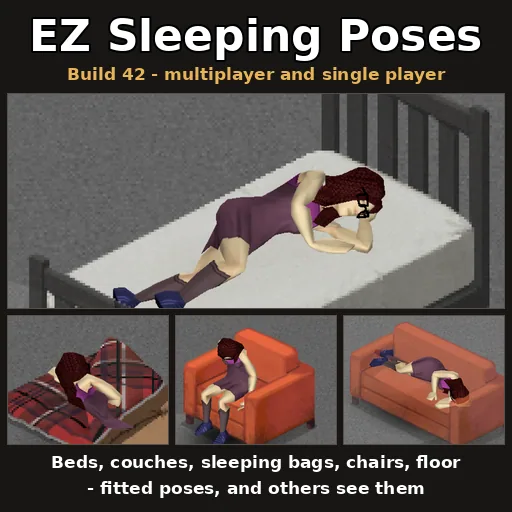



EZ Sleeping Poses adds realistic sleeping animations to Project Zomboid, making characters lie down or sit when sleeping on various furniture, with multiplayer support and customization options.
EZ Sleeping Poses enhances the visual immersion of Project Zomboid by making characters adopt realistic sleeping positions depending on where they rest. This affects both singleplayer and multiplayer games.
Sleeping Animations
- Beds, couches, benches, mattresses, sleeping bags, tents: The character lies down along the furniture, then falls asleep. Upon waking, they sit up and get off.
- Bunk beds: Options for sleeping on the bottom or top bunk.
- Chairs: The character sits and slumps over to sleep.
- Floor: The character lies down directly on the ground.
Each furniture type has a specific pose, including adjustments for position, height, orientation, head direction, and-for sleeping bags-a slight tilt. If the pose cannot be performed due to an obstruction, the default sleep animation is used. Walking away cancels the sleep attempt.
Multiplayer Functionality
Other players see your character sleeping in the appropriate pose and height. The game handles these visualizations locally for each client, so no extra data is sent over the network-each client draws other sleepers lying on beds independently.
Settings
Sandbox options on the EZ Sleeping Poses page allow customization:
- Enable or disable sleeping poses.
- Enable or disable showing other players lying on beds.
- Toggle climb in/out animations for each furniture type (beds, mattresses, sleeping bags, couches, benches, pews, etc.). When enabled, the character uses the game's get-into-bed animation before assuming the sleeping pose and climbs off when waking up. For mats, sleeping bags, and mattresses, only the basic getting-up animation is used. The floor and tents always use direct transitions. These animations are enabled by default except for the top bunk.
- If already sitting on a couch, bench, or pew, the character lies down from their sitting position (first sitting up sideways, then lying back), always on their own end of the furniture.
Admin Tools
Admins have access to a Sleep pose editor (Options > Mods, then right-click furniture) to fine-tune poses for each furniture type. Changes are saved with the world and sent to all players. The Stage furniture button places one of each furniture type nearby for testing poses, and Remove staged furniture removes them (within 40 tiles on the same floor; also clears staged lineups from older versions).


Comments 0
No comments yet — be the first.
Log in or sign up to leave a comment.