












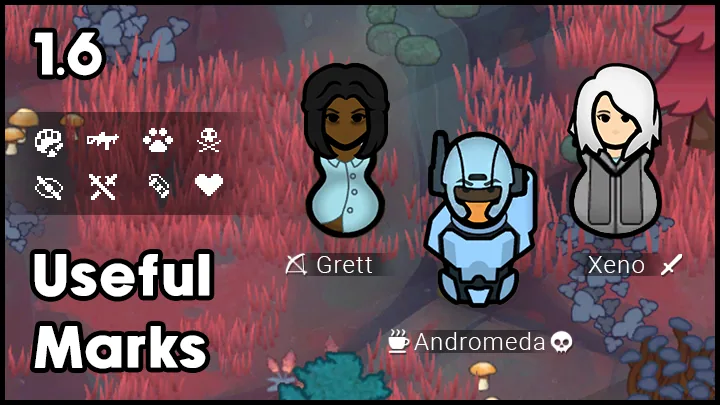



Useful Marks adds compact pixel-art markers for any pawn in RimWorld, with manual icons, automatic tagging rules, optional text labels and support for the colonist bar and 1.6 trade dialogs.
Useful Marks adds small pixel-art markers that can be assigned to any pawn in RimWorld. The icons are designed to stay crisp and unobtrusive against the game UI while providing useful information at a glance.
Marking pawns
- Open the pawn information panel, find the marker button and select the desired icon.
- Color and other marker settings are available in the same place, through the last icon.
- An optional text tag can be shown under the pawn's name. It is configured where the rest of the pawn biography settings are located.
- Some icons have multiple layers, allowing custom variations.
- Marks are also displayed on the colonist bar.
- In RimWorld 1.6, marks work in the caravan forming dialog and the slave trade dialog.
Automatic markers
The mod includes a default set of rules that automatically assigns tags to pawns. By default, melee and ranged raiders are marked with their respective icons, so their equipment type can be seen without checking their gear or opening interface tabs. Raiders and allies who are relatives of your colonists are also tagged automatically.
Other default conditions include a thermometer or snowflake icon when a colonist is in unsafe temperature conditions, marks for sick pawns and marks for pawns who have taken GoJuice or other drugs. The default set includes additional automatic markers as well.
Custom icons and settings
- Custom icons can be added by placing them in the mod's Textures/Marks folder; they then appear in the game automatically.
- To hide the text tag under a pawn's name, select the cross in the colors menu.
- The adaptive icon color follows the pawn name color, for example blue for an ally and red for a hostile pawn.
- The author plans to add more icons as possible and accepts suggestions for additional automatic conditions.
Compatibility and saves
The description lists Combat Extended, UI Not Included, CM Color Coded Mood Bar and Float Sub-Menus as compatible. Float Sub-Menus is recommended for the search bar and is noted as applicable only to version 1.5.
Adding the mod to an existing save is OK, and removing it is also OK. The author describes performance as lightweight as possible and uses pixel art to keep small icons crisp.

Comments 0
No comments yet — be the first.
Log in or sign up to leave a comment.