







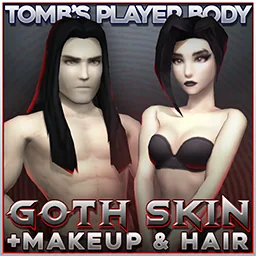



Adds a pale replacement for Skin Tone 1 of Tomb's Player Body Overhaul, makeup and dynamic hairstyles. It works on stable B42 and is split into modules.
Contents
Adds a pale replacement for Skin Tone 1 of Tomb's Player Body Overhaul, makeup and dynamic hairstyles. It works on stable B42 and is split into modules.
Textures and load order
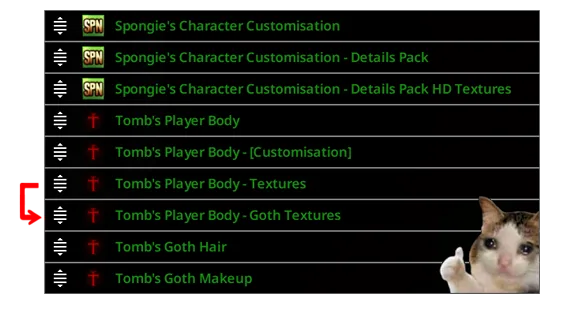
- For the pictured appearance, install the full Spongie's Character Customisation and Tomb's Player Body with its textures.
- Choose the Goth Skin texture module matching your body texture pack. B42 disallows mismatched pairs.
- Load Goth Skin textures after all base Tomb's modules, including Customisation. On B41, a compatible load-order manager such as Mod Manager for B41 may be needed.
- Restart the game. Skin Tone 1 is replaced. The body texture can also be applied to the vanilla body, with a different appearance.
Hair and makeup
Hair and makeup can be enabled independently and work with the vanilla body. Hairstyles require Fluffy Hair. The author recommends Spongie's Hair API to choose longer styles when cutting hair in game. B41 multiplayer: add hair mods under Steam Workshop in server options. Adding them under Mods does not load them.
Spongie's custom face textures can look yellow next to the paler skin. Some hairstyles may still clip with certain hats. The author tested hair on vanilla and Tomb's bodies in B41 and B42. Safe to add to existing saves, with a backup recommended. Pairs with Tomb's Wardrobe – Alternative.

Comments 0
No comments yet — be the first.
Log in or sign up to leave a comment.