
















Redesigns the vehicle mechanics window using NeatUI Framework. Pin individual cars and compare a donor with the vehicle under repair. Tabs last until returning to the main menu. Cars within 20 m stay live. Out-of-range or unloaded cars show cached details.…
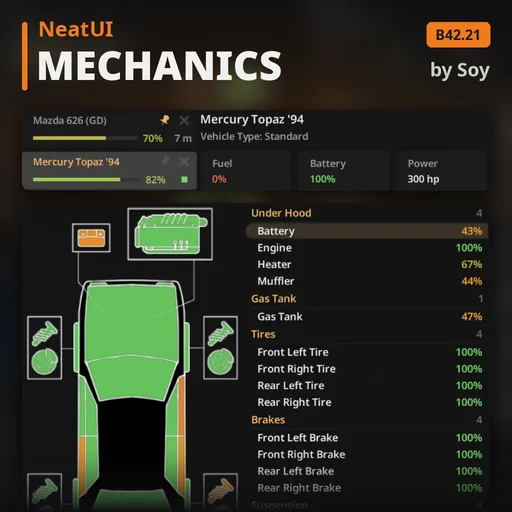
Redesigns the vehicle mechanics window using NeatUI Framework. Pin individual cars and compare a donor with the vehicle under repair. Tabs last until returning to the main menu. Cars within 20 m stay live. Out-of-range or unloaded cars show cached details. Reinspect after going over 20 m away or after outside changes to parts, fuel or battery.
Parts and controls
View the colour-coded parts map, total condition, power, fuel, battery, trunk and missing or worn components. Filter and search the part list. Details, tool requirements, chances, XP and other mods’ context actions appear in the panel. Actions can be text or icons and temporarily remove and reinstall obstructing components such as tires. Open via the left sidebar. Arrow keys or D-pad navigate, Enter/A acts, Page Up/Down or bumpers switch cars, Insert/Y pins, Home/End jump and slash opens search.
Best Parts
Scan pinned cars, inventories and nearby containers, then review upgrades, odds and steps. Old parts can move to the donor, stay in inventory or be dropped. Standard actions remove target parts first, then swap. Set one to three attempts. Failed work can damage parts by 5–9 condition. Untick risky upgrades automatically. Optionally score Regular and Performance parts 15% and 25% above Old. Covered parts can be handled automatically. Health protection stops transfers at 30% by default.
Compatibility and settings
Client-side. Uses native actions and includes additions from compatible mods. Takes the mechanics window when Neat Rocco’s UI is also enabled. Settings include layout, size, columns, controls, smooth scrolling, hood behaviour and automation limits.

Comments 0
No comments yet — be the first.
Log in or sign up to leave a comment.