
















A framework for Project Zomboid Build 41 that allows mod authors to add customizable options to their mods. Compatible only with Build 41.
Contents
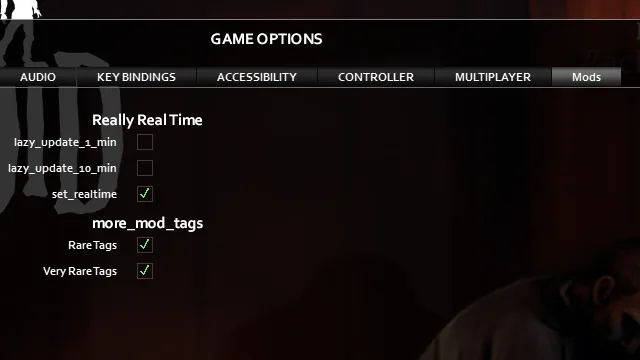
Mod Options (Build 41) is a framework for Project Zomboid that enables other mods to offer customizable settings. Mod authors can integrate their own options into their mods using this framework, allowing users to adjust mod behavior through a dedicated interface.
Compatibility and Requirements
- Compatible only with Project Zomboid Build 41.
- For Build 42, a different version is required.
Usage for Mod Authors
To add custom options to your mod:
1. Place your code in the media/lua/client subfolder of your mod.
2. Define your default options in a Lua table, for example:
lua
   local OPTIONS = {
     box1 = true,
     box2 = false,
   }
3. Connect these options to the menu so users can change them:
lua
   if ModOptions and ModOptions.getInstance then
     ModOptions:getInstance(OPTIONS, "MyModID", "My Mod")
   end
4. To check the current values at game start:
lua
   Events.OnGameStart.Add(function()
     print("checkbox1 = ", OPTIONS.box1)
     print("checkbox2 = ", OPTIONS.box2)
   end)
- The mod should be enabled for options to work, but mods using this framework will still function without it. There is no hard dependency.
Features
- Supports customizable options for mods, including checkboxes and sandbox options.
- Planned or in-progress features include:
- Edit input fields
- Color selection options
- Ability to add custom tabs
- Server admin-only tuning via UI
Steam Workshop Troubleshooting
If you encounter issues with the Steam Workshop version: 1. Quit the game. 2. Unsubscribe from the mod and wait about 1 minute. 3. Subscribe again and wait about 1 minute. 4. Ensure the mod version is 1.4.4.
Screenshots 1

Comments 0
No comments yet — be the first.
Log in or sign up to leave a comment.