












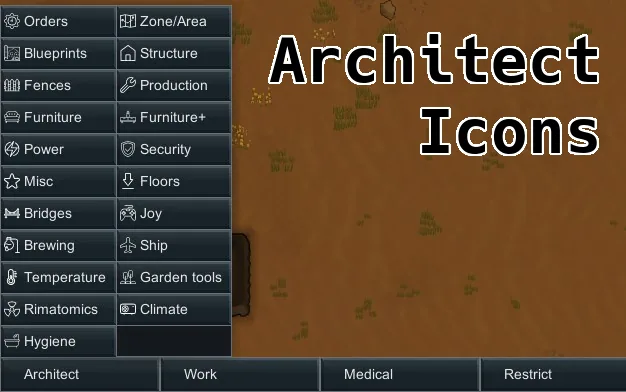



Architect Icons adds visual cues to the Architect Tab in RimWorld. No more random clicking to find stuff.
Architect Icons is a utility mod for RimWorld by Ludeon Studios that enhances the user experience within the Architect interface. The primary function of this modification is to replace generic placeholders with specific visual icons for different tabs and mods. This system eliminates the need for users to randomly click through the list to locate specific settings or tools, making navigation significantly faster and more intuitive.
Customization and Mod Support
The mod handles unsupported content gracefully by displaying a placeholder icon when a specific mod is not recognized. Users can suggest support for specific mods, and there are plans in development for a future API that will allow mod authors to include their own icons directly within their packages. The current version of the software is 1.8.
Installation and Custom Icons
For gamers who wish to customize the interface or add their own icons, the process involves placing a specific file next to the text file in the ArchitectIcons folder located in the save directory. The system creates this list automatically on game launch when the Architect tab is opened with ArchitectMods enabled. Users must create a 16x16 PNG icon and name it exactly as one of the tabs, ensuring case sensitivity is maintained.
For modders looking to add an icon to their own tab, the file should be placed in the /Textures/UI/ArchitectIcons/.png path. The icons used in the base package were designed by Good Ware, Freepik, Smashicons, and Nikita Golubev from Flaticon.
- Place the 16x16 PNG icon next to the text file in the ArchitectIcons folder.
- Ensure the filename matches the tab name exactly, including capitalization.
- The icon will be added automatically upon the next game launch.

Comments 0
No comments yet — be the first.
Log in or sign up to leave a comment.