 Razilator
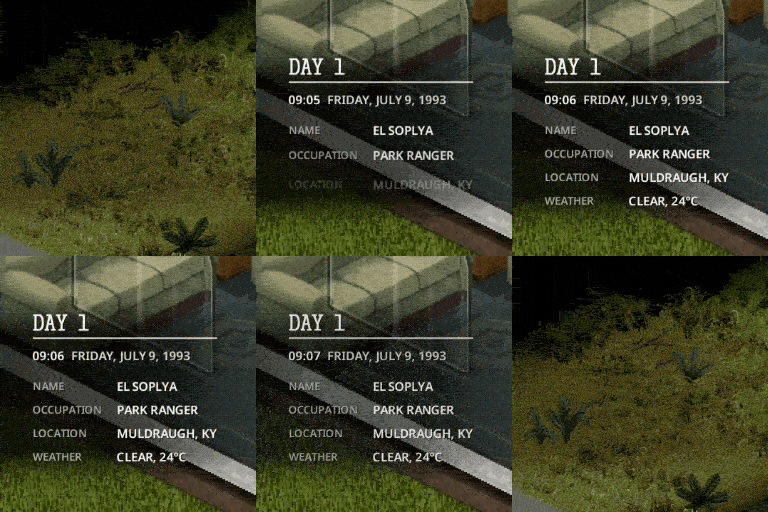
A short briefing at the start of every chapter of your survival. What day and time it is, who you are, where you are, what the weather's doing and how many zombies you've put down, all shown on screen like the title card at the start of a TV episode.
Survivor Briefing
A short briefing at the start of every chapter of your survival. What day and time it is, who you are, where you are, what the weather's doing and how many zombies you've put down, all shown on screen like the title card at the start of a TV episode.
The briefing fades in, stays for a few seconds and fades back out. It never intercepts your clicks, so it stays out of your way.
17 looks
Choose from 17 different looks, each with its own sound.


Try every look on your own character: Options > Mods > Survivor Briefing > Preview the looks.
Your own notes
Add up to three notes of your own, each with a title and five lines. They appear at the bottom of your briefings in the world you wrote them for (like the last tile in the GIF above).
Write them under My notes in the mod's options.
What the briefing shows
- day of survival, time and date, with the clock still ticking;
- your character's name and occupation;
- the town you're in, or how far the nearest one is, plus a landmark nearby;
- weather and temperature;
- zombies killed, and bandits killed too if you use the Bandits mod;
- optional: day of the outbreak, server day and characters lost.
Realism mode. Turn on Only what your character can know and you'll need a watch to see the exact time, and a digital one to know the date and temperature.
When it appears
Always: - when a survivor starts out; - when you load a save; - once a day: at midnight, at an hour you choose, or at sunrise; - when you wake up.
Optional: - when you enter a town; - when you close the pause menu; - at the press of a key you pick.
Settings
Everything lives in Options > Mods > Survivor Briefing: - look; - screen position: any corner, centre, top centre or bottom centre; - text size; - how long it stays on screen; - motion; - sound volume; - every line and every trigger can be toggled on its own.
Good to know
- Multiplayer: each player sees only their own briefing, with their own settings.
- Safe to add or remove mid-save. The mod writes nothing to your save.
- Modded maps: town names are taken from the map's own labels. Map makers can add places with
SurvivorBriefing.addTownandSurvivorBriefing.addLandmark. - Languages: English, Ukrainian, Russian, Spanish, French, Brazilian Portuguese, Simplified Chinese (thanks to 歪比巴伯~) and Turkish (thanks to xeotN).
- Fonts and sounds: free fonts with their licences included; the sounds were made specially for this mod.
Comments 0
No comments yet — be the first.
Log in or sign up to leave a comment.