
 Razilator
Improvements to Kenshi that regular mods simply can't make. Kenshi's standard modding tools can do a lot, but they can't touch the game's own code. RE_Kenshi does exactly that: it patches the executable, fixes long-standing bugs, speeds up loading and gives modders a C++ plugin system.
Contents
RE_Kenshi
Improvements to Kenshi that regular mods simply can't make. Kenshi's standard modding tools can do a lot, but they can't touch the game's own code. RE_Kenshi does exactly that: it patches the executable, fixes long-standing bugs, speeds up loading and gives modders a C++ plugin system.
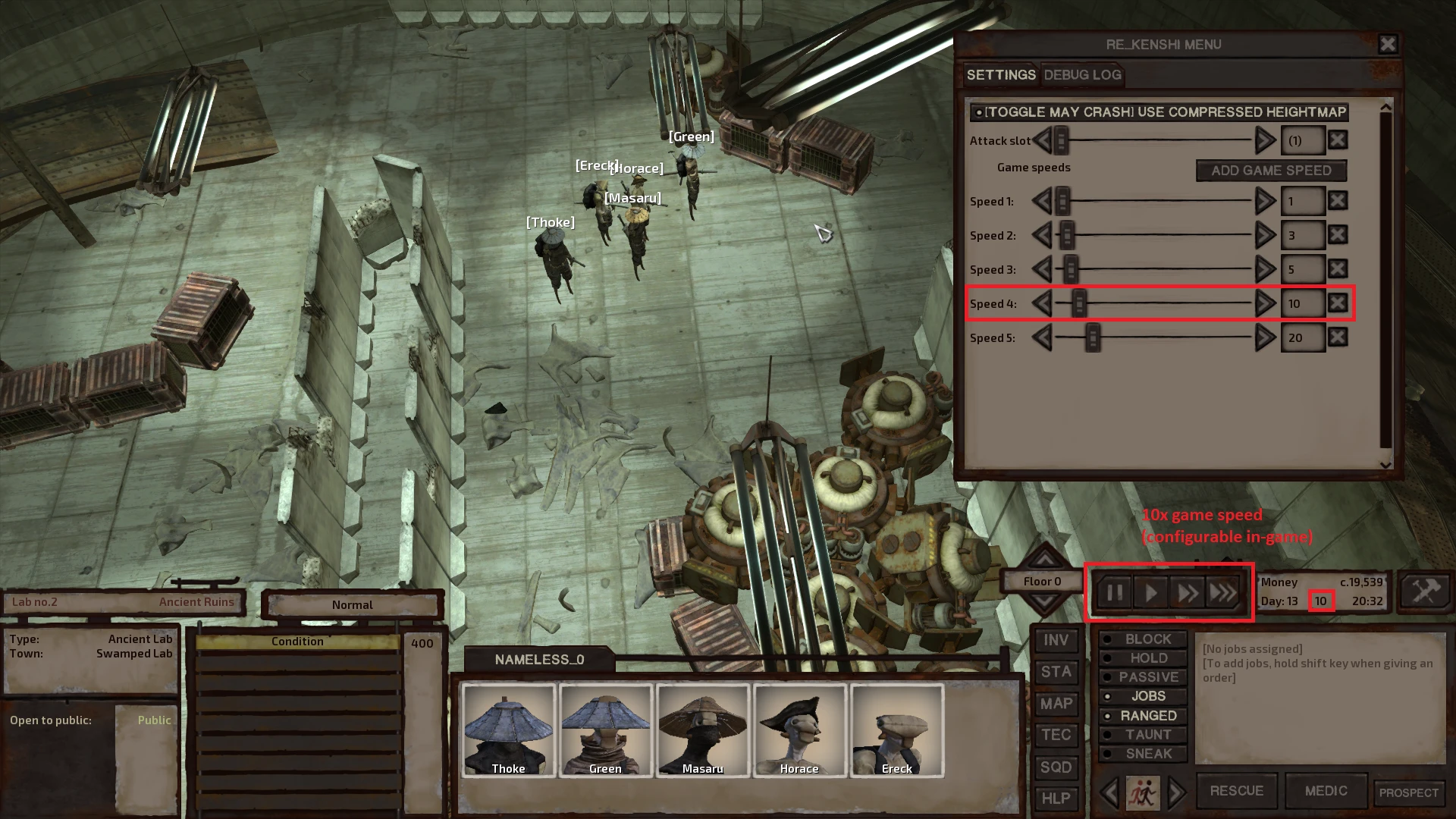
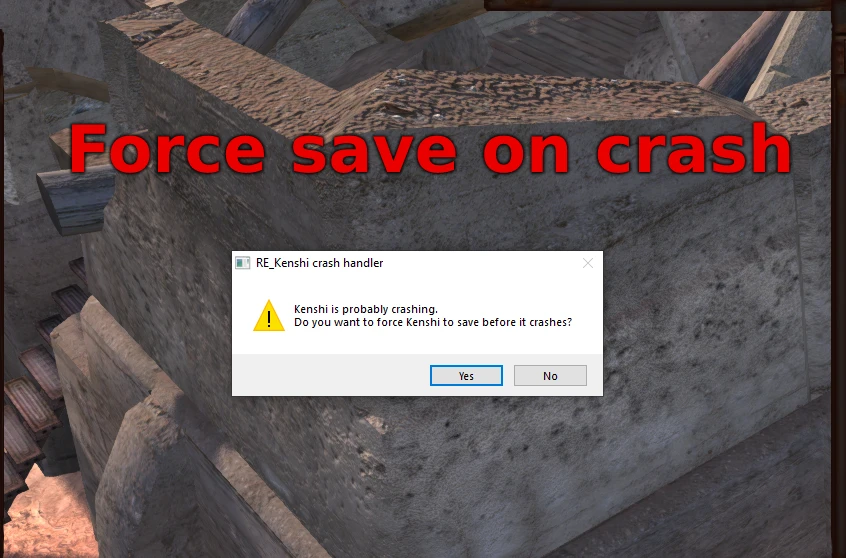
The most noticeable features for players are saving when the game crashes and any game speed you like, from slow motion to 3.5× and beyond.
Compatibility
- No import needed.
- Should work with every mod. If you run into a conflict, report it to the author as a bug.
- Supported versions: Kenshi 1.0.65 and 1.0.68, on both Steam and GOG.
⚠️ During installation, 1.0.68 is partially downgraded to 1.0.65; this is required for compatibility.
For players
- Save on crash. If the game goes down, it saves before it does.
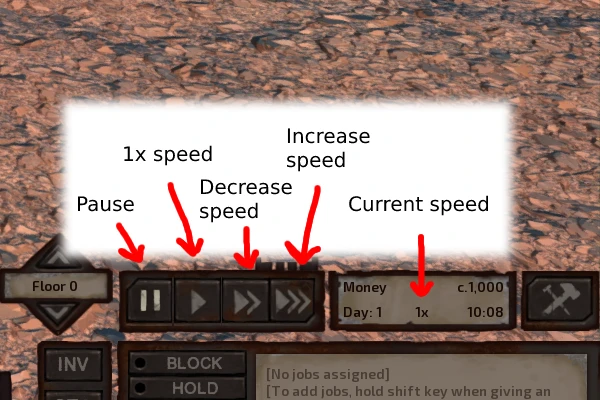
- Any game speed. The "x2" and "x5" buttons can be set to whatever value you want.
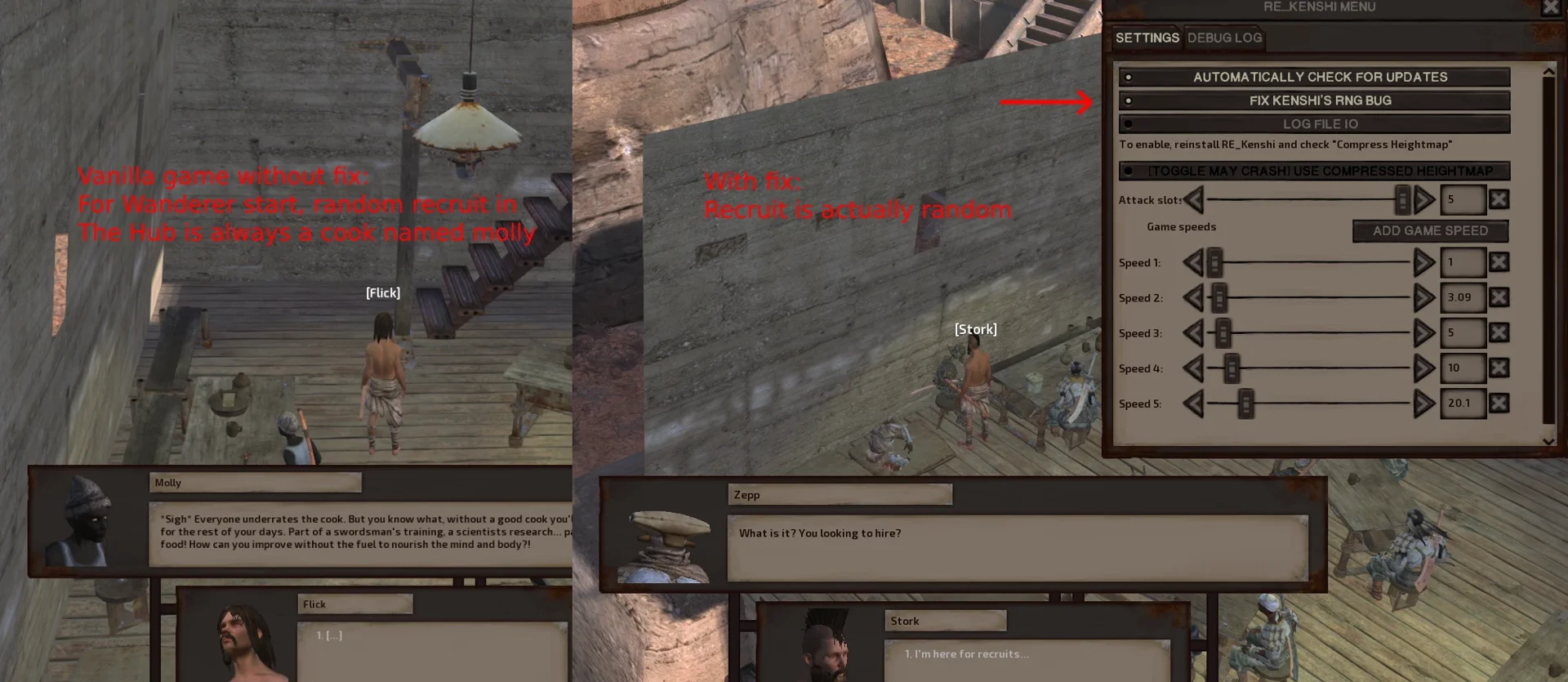
- Random number generator fixed. The random recruit in The Hub is finally actually random, rather than always being a cook named Molly.
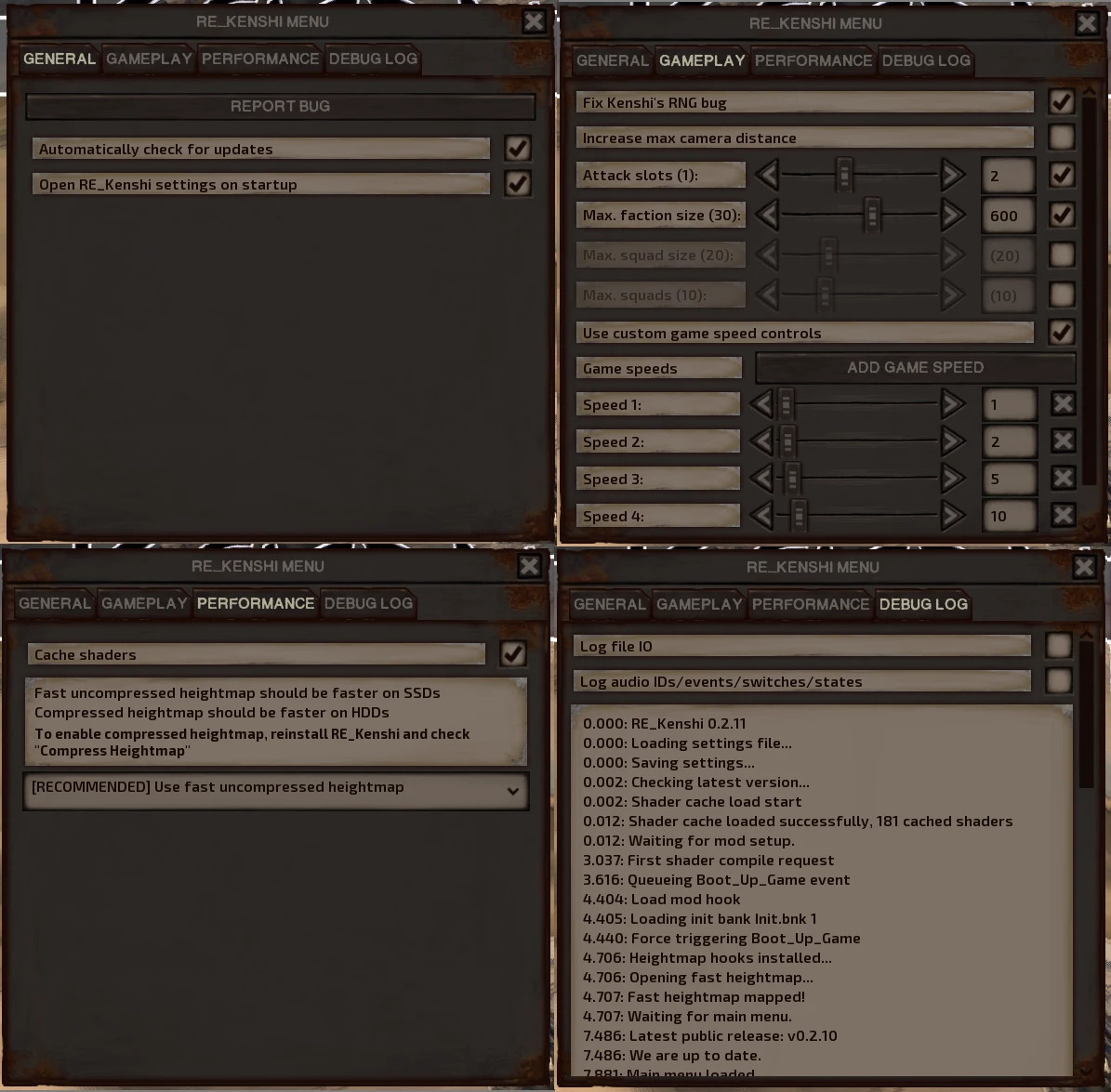
- Number of attack slots can be changed in-game.
- Camera goes twice as high as normal.
- Compressed heightmap makes loading noticeably faster on HDDs.
- Precompiled shader cache speeds up loading into both the main menu and the game.
More on each feature in the mod's Wiki.
For modders
- A C++ plugin system for patching the game's code.
- Modding of files with hard-coded paths, such as the heightmap (documentation on GitHub).
- Soundbank modding: add new sounds and replace existing ones (GitHub documentation still in progress).
Details in the mod's Wiki.
Installation
The mod changes Kenshi's executable and/or config files. An automated installer handles this and checks thoroughly for errors along the way, so it's very unlikely to break your game.
- Download the archive and extract it anywhere.
- Run the installer and follow its instructions.
- Launch the game as usual; RE_Kenshi loads on its own.
Tip: launching through the RE_Kenshi shortcut in your Start menu or on your desktop opens the game about a second faster, since it skips part of the initialization.
How to check it worked: the version line in Kenshi's main menu should look like this:
RE_Kenshi vx.x.x - Kenshi 1.0.x - x64 (Newland)
Settings
Everything is changed through the mod's in-game menu:
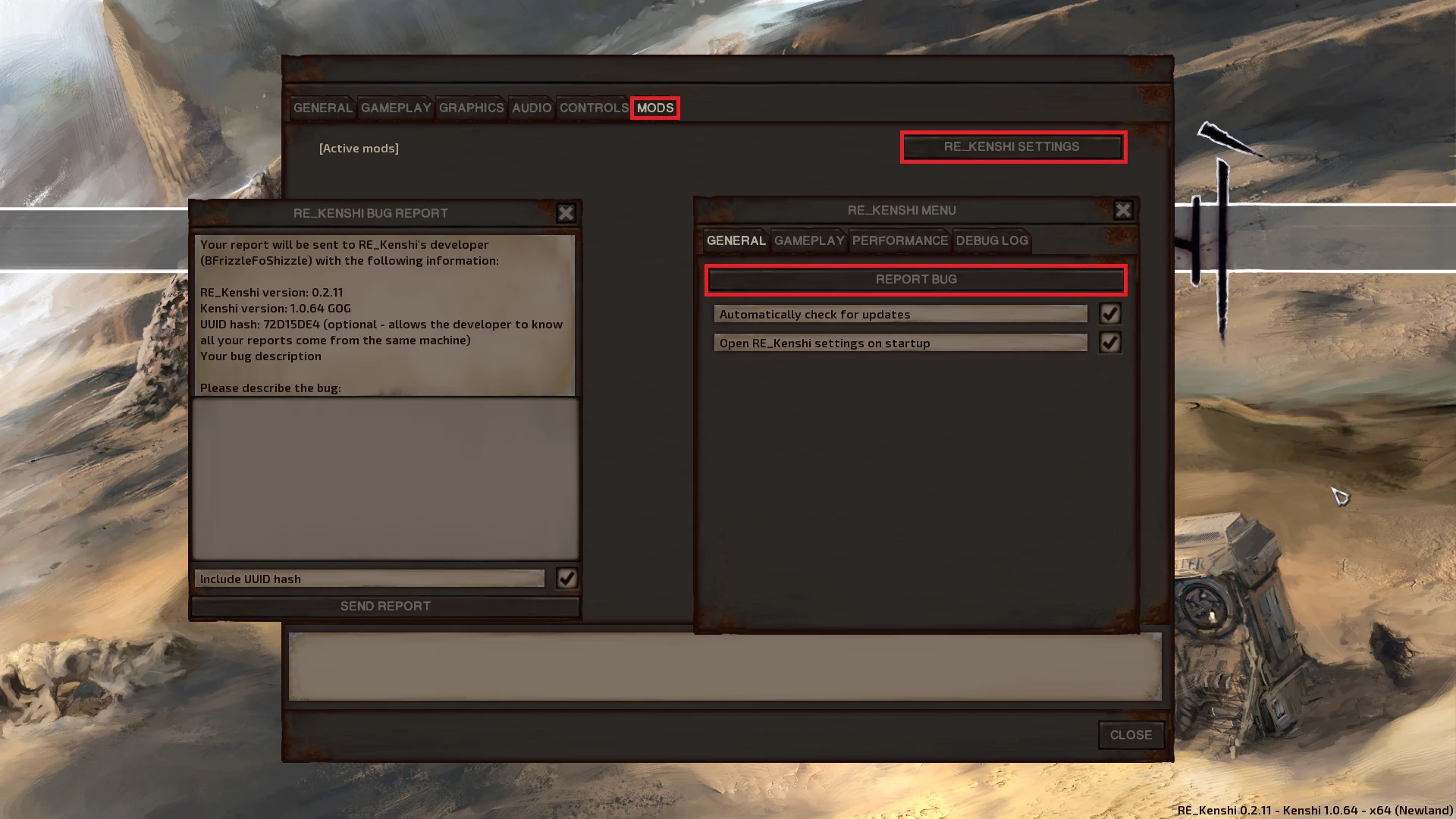
- from the main menu: OPTIONS → MODS → RE_KENSHI SETTINGS
- in-game: Esc → OPTIONS → MODS → RE_KENSHI SETTINGS
About game speed. Values don't have to be whole numbers: 0.5 or 0.1 give you slow motion, 3.5 speeds things up, and so on.
⚠️ Negative speed values crash the game.
Common issues
"DLL not found" during installation. This is most often caused by a missing Visual C++ Redistributable (VC++ Redistributable). Download the latest version from Microsoft's website.
The game starts in version 1.0.65.
That's expected: RE_Kenshi is technically incompatible with 1.0.68, so installation partially rolls the game back to 1.0.65, which it then starts in by default. To run 1.0.68, add the --norekenshi flag to Kenshi's launch options. This also disables RE_Kenshi, since it doesn't work with that version.
Can't talk to recruits. Check the max squad size, faction size and factions sliders in RE_Kenshi's settings and make sure they're at sensible values. Dragging a slider all the way to 0 resets it to the game's default, or to whatever your mods have set. If you can't find the settings menu, see the second screenshot on the mod's Nexus page, "How to access the settings menu and send bug reports".
Uninstalling
- Run the installer.
- Point the dialog to your Kenshi install folder.
- Click Uninstall.
If the uninstaller has trouble: open Plugins_x64.cfg in your Kenshi folder and delete the line Plugin=RE_Kenshi; the mod will no longer load.
Test builds
Prerelease builds are posted in the #rekenshi-prerelease channel on the Genesis Modding Guild Discord server.
Credits
Translators: Hack, Boron, Chigasane, Gearpunk.
Testing help: the Genesis Modding Guild community.
Special thanks to Atlas and Boron for endless help and support throughout the project.
Screenshots 6
Comments 0
No comments yet — be the first.
Log in or sign up to leave a comment.