












Vehicle Repair Overhaul expands vehicle repairs and salvaging in Project Zomboid. Restore body panels, suspension, tires, brakes, and other components, then recycle old vehicles for useful resources. Supports Build 41, Build 42, multiplayer, and custom vehicles.
Содержание
- Key Features of Vehicle Repair Overhaul
- Expanded Vehicle Repair System
- Fix A Flat - Emergency Tire Repairs
- Salvaging Vehicle Parts for Resources
- Complete Vehicle Salvaging - Salvage Vehicle
- Compatibility With Custom Vehicle Mods
- Build 41 and Build 42 Compatibility
- Load Order and Potential Conflicts
- How to Install Vehicle Repair Overhaul
- Can You Add or Remove the Mod From Existing Saves?
- Who Should Use Vehicle Repair Overhaul?
- Information for Multiplayer Server Owners
- Technical Information
Vehicle Repair Overhaul - Expanded Vehicle Repairs and Salvaging for Project Zomboid
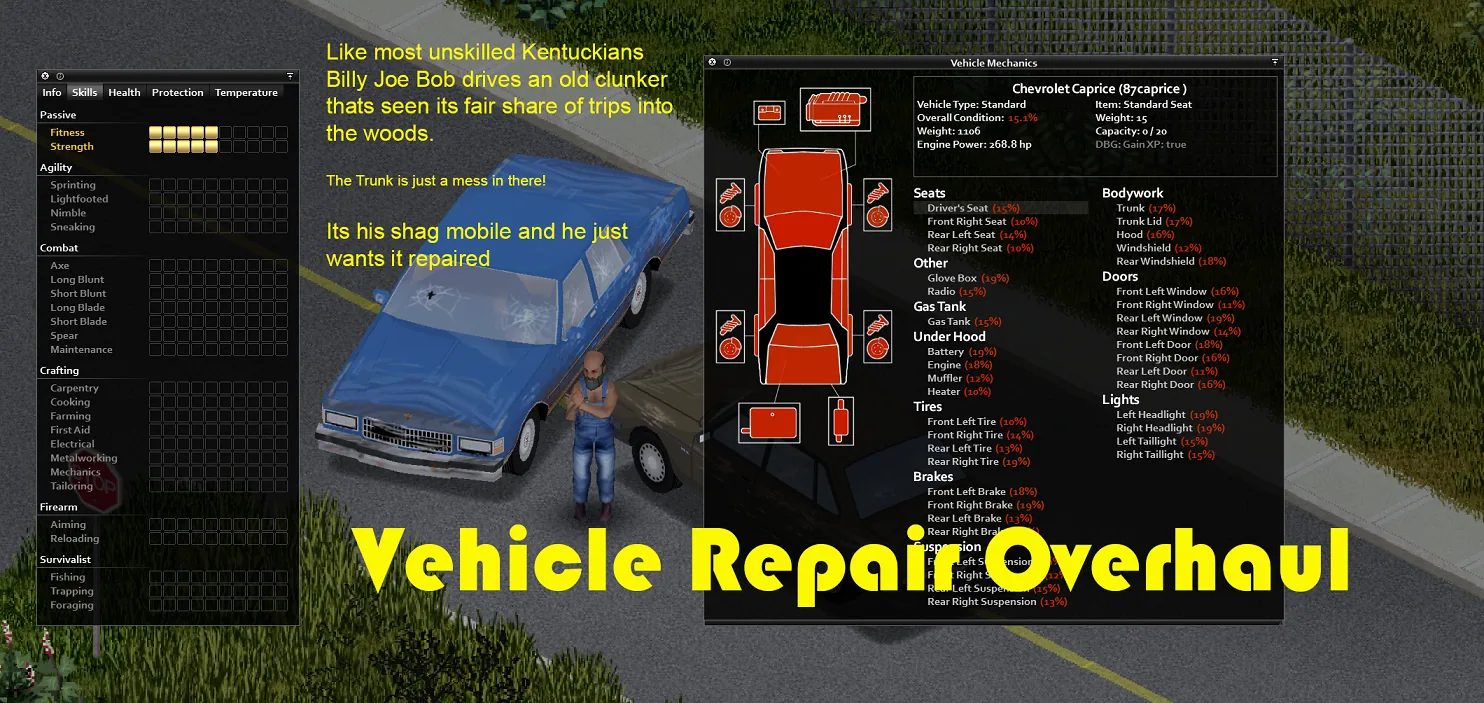
Vehicle Repair Overhaul is an extensive Project Zomboid mod that significantly expands vehicle maintenance, restoration, and salvaging. Instead of abandoning heavily damaged cars, players can gradually restore them using scavenged materials, specialized tools, and their character's mechanical skills.
In vanilla Project Zomboid, some vehicle components are easier to replace than repair. Vehicle Repair Overhaul changes this by introducing additional repair options for body panels, suspension, brakes, seats, windows, tires, and numerous vehicle accessories.
The mod also allows players to salvage individual components for useful materials or completely dismantle unwanted vehicles, clearing roads and recovering valuable resources.
Vehicle Repair Overhaul supports Project Zomboid Build 41 and Build 42, including multiplayer. It works with vanilla vehicles and a wide selection of custom vehicles available through the Steam Workshop.
Key Features of Vehicle Repair Overhaul
The mod transforms vehicle maintenance into a more detailed gameplay system where scavenged resources and technical skills become just as important as replacement parts.
Its main features include:
- Expanded vehicle repairs. Restore damaged body panels, wheels, brakes, suspension, seats, and other components.
- More uses for everyday materials. Repair vehicles using duct tape, glue, fabric, metal parts, springs, screws, and welding equipment.
- Vehicle part salvaging. Break down unwanted components to recover metal, fabric, electronic scrap, and other resources.
- Complete vehicle dismantling. Salvage abandoned vehicles and remove them from the world.
- Skill-based resource recovery. Improve your salvaging results through Mechanics and Metalworking skills.
- New Fix A Flat item. Use a special tire repair product for temporary repairs.
- Custom vehicle support. Repair many Workshop vehicles in addition to the standard Project Zomboid fleet.
- Multiplayer compatibility. Use the expanded repair and salvaging systems on cooperative and dedicated servers.
Vehicle Repair Overhaul is particularly valuable in survival scenarios where working vehicles are scarce and replacement parts are difficult to find.
Expanded Vehicle Repair System
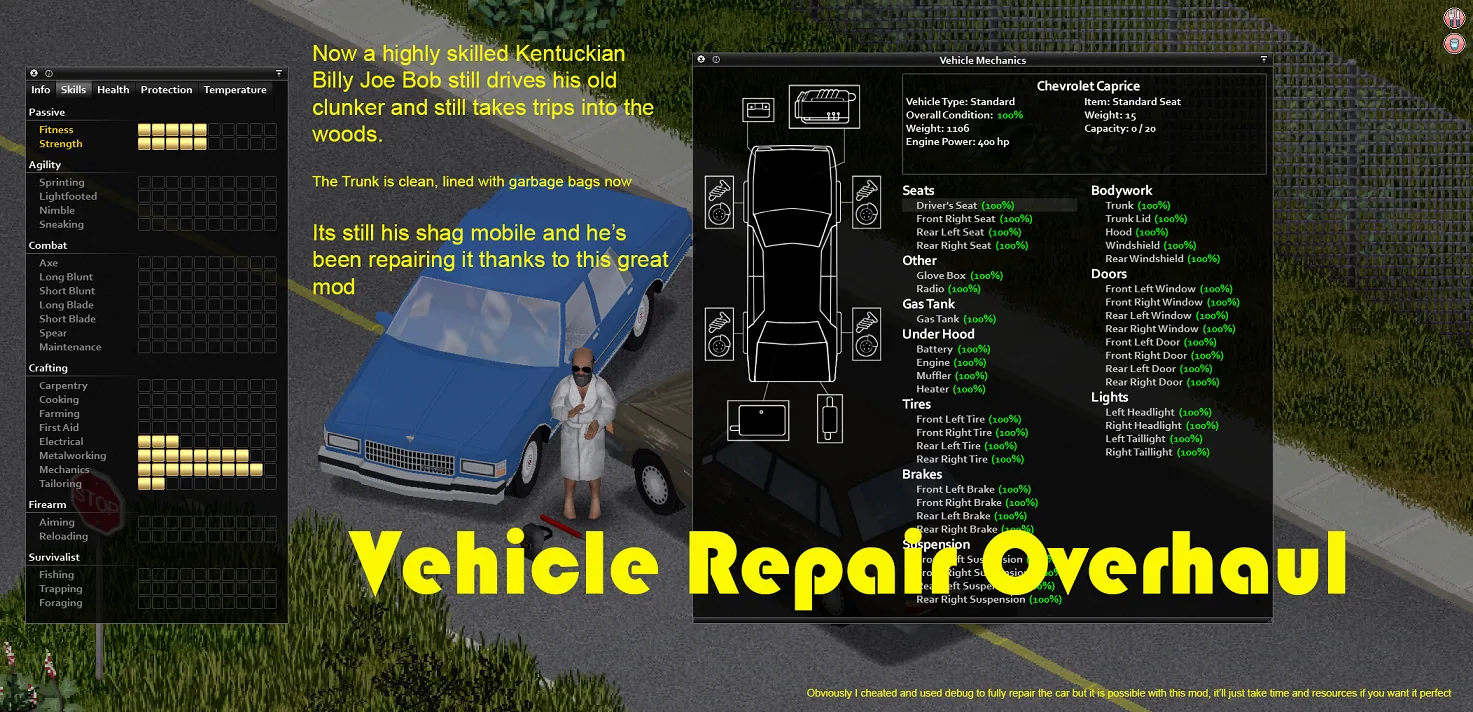
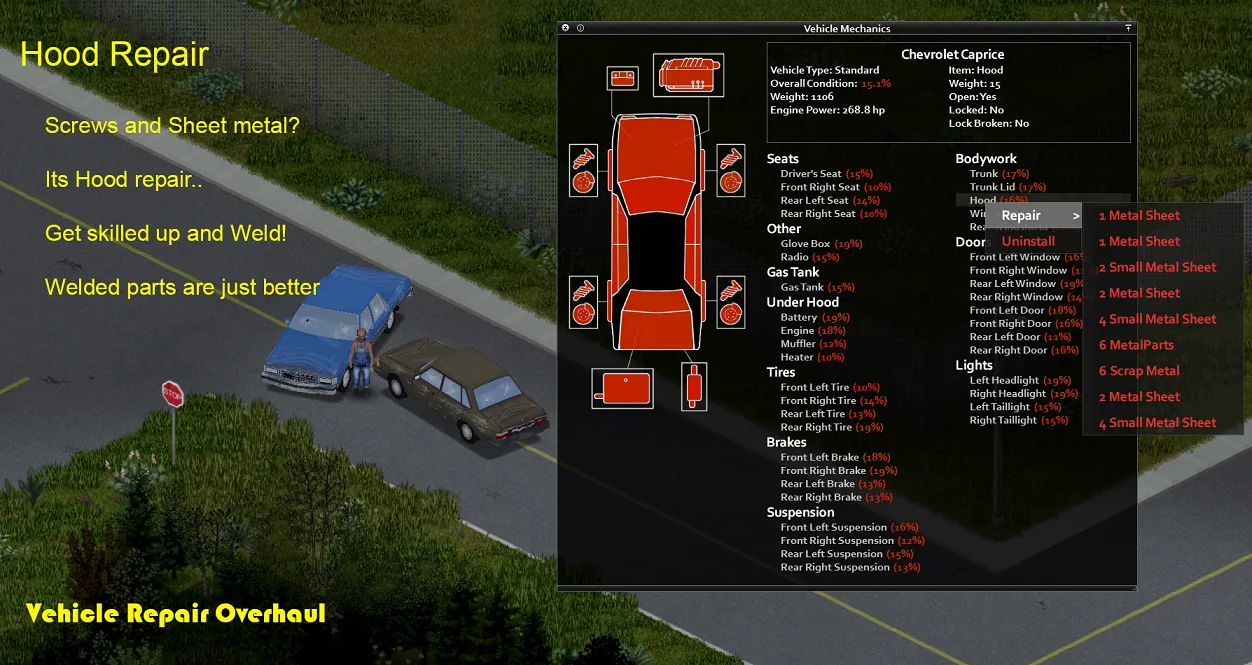
The mod's primary feature is a much wider selection of vehicle components that can be repaired rather than completely replaced.
A damaged vehicle no longer necessarily means searching for another car or a rare replacement part.
Which Vehicle Parts Can You Repair?
Vehicle Repair Overhaul expands maintenance options for many vehicle components.
| Category | Supported Components |
|---|---|
| Bodywork | Hoods, trunks, doors |
| Windows | Windshields, side windows |
| Wheels | Tires and related components |
| Running gear | Brakes, suspension |
| Interior | Seats, glove boxes |
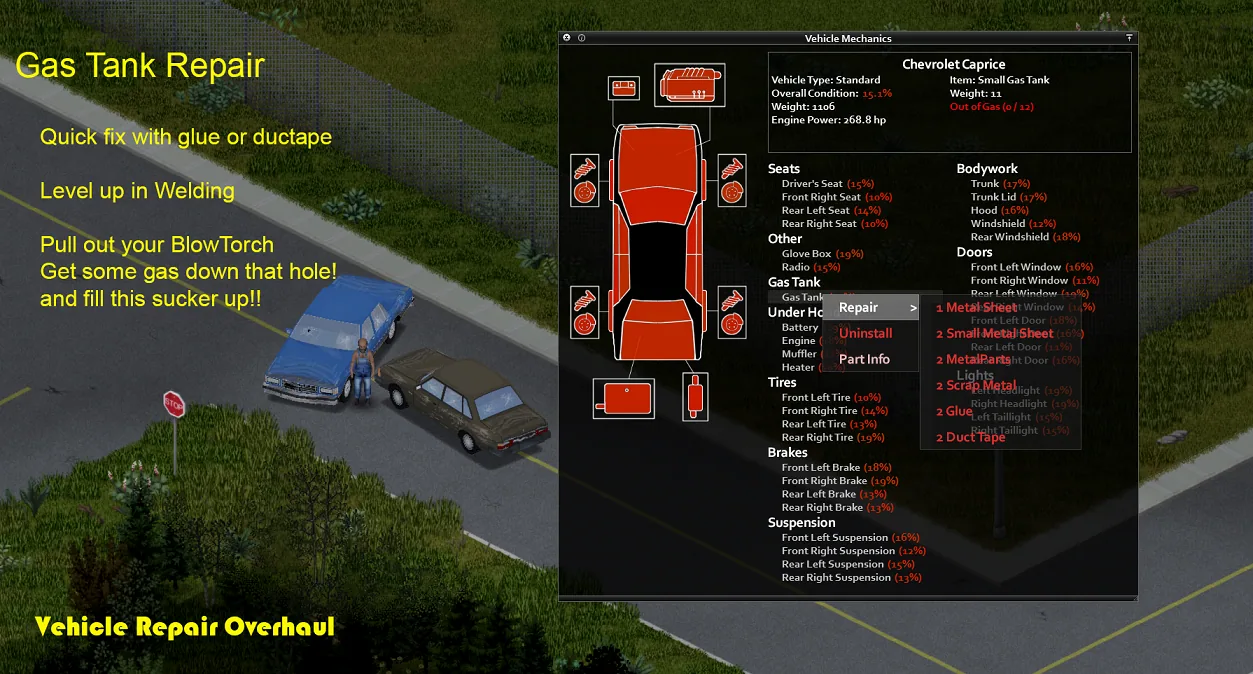
| Fuel system | Gas tanks |
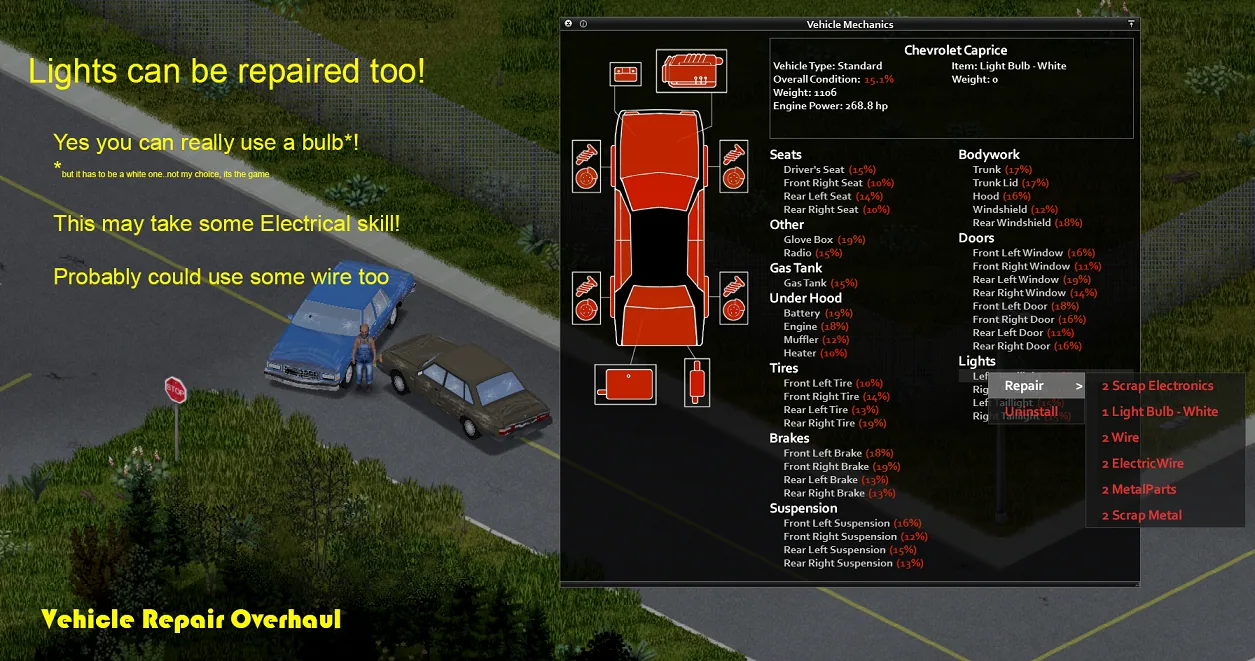
| Lighting | Headlights and other lighting components |
| External equipment | Roof racks and vehicle accessories |
| Trailers | Supported trailer components |
| Cargo equipment | Cargo containers and additional storage structures |
| Protection | Armored vehicle parts |
Available repair actions depend on the component and the compatibility of any custom vehicle mods being used.
Different components require different materials and tools.
Repairing Vehicles With Scavenged Materials
Vehicle Repair Overhaul gives many common items additional uses in vehicle maintenance.
Depending on the damaged component, repairs may require:
- Duct tape - useful for minor damage and temporary repairs.
- Glue - used in certain basic repair operations.
- Fabric and sheets - useful when restoring interior components.
- Metal bars - required for certain mechanical repairs.
- Springs - used when working with suspension components.
- Light bulbs - needed to repair vehicle lighting.
- Screws and metal materials - used for more substantial repairs.
- Blowtorch - required for certain repairs involving metalworking.
Each material serves a different purpose, and the exact requirements depend on the selected repair action.
This gives players more reasons to collect ordinary supplies, even when those items aren't immediately useful for crafting or construction.
Why Mechanics Skills Matter More
In vanilla Project Zomboid, Mechanics is often developed primarily to remove and install vehicle components.
Vehicle Repair Overhaul expands the practical value of the skill.
Characters can specialize in restoring damaged vehicles, maintaining a fleet, and recycling unwanted parts.
Mechanics and Metalworking also contribute to salvaging efficiency.
As your character develops these skills, dismantling vehicle components can become more rewarding.
Fix A Flat - Emergency Tire Repairs
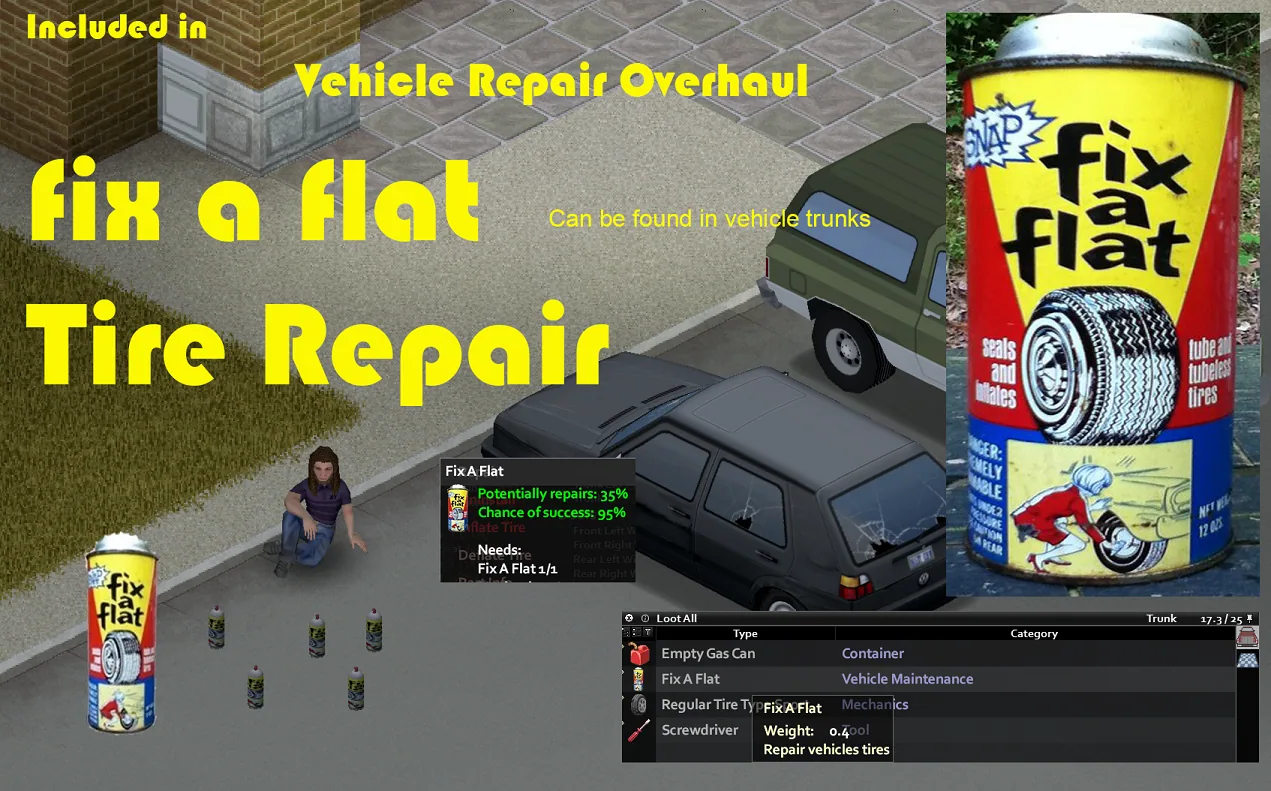
Vehicle Repair Overhaul introduces a new item called Fix A Flat.
This consumable is designed to provide temporary repairs for damaged tires.
It can be particularly useful when your vehicle suffers tire damage and you don't have a suitable replacement available.
Where to Find Fix A Flat
Fix A Flat can be discovered inside vehicle trunks.
A useful feature is that multiple Fix A Flat cans can be combined, allowing players to consolidate their remaining contents.
This makes partially used cans more convenient to store and manage.
When Should You Use Fix A Flat?
The item is intended as a temporary solution rather than a permanent replacement for a working tire.
It's especially useful when you need to:
- Restore a damaged tire sufficiently for continued travel.
- Escape an unsafe location.
- Reach your base or a suitable garage.
- Find a proper replacement tire.
The mod's developers describe Fix A Flat as a way to keep your vehicle operational until you can change the tire.
For long-term vehicle maintenance, replacing badly damaged tires remains the better option.
Salvaging Vehicle Parts for Resources
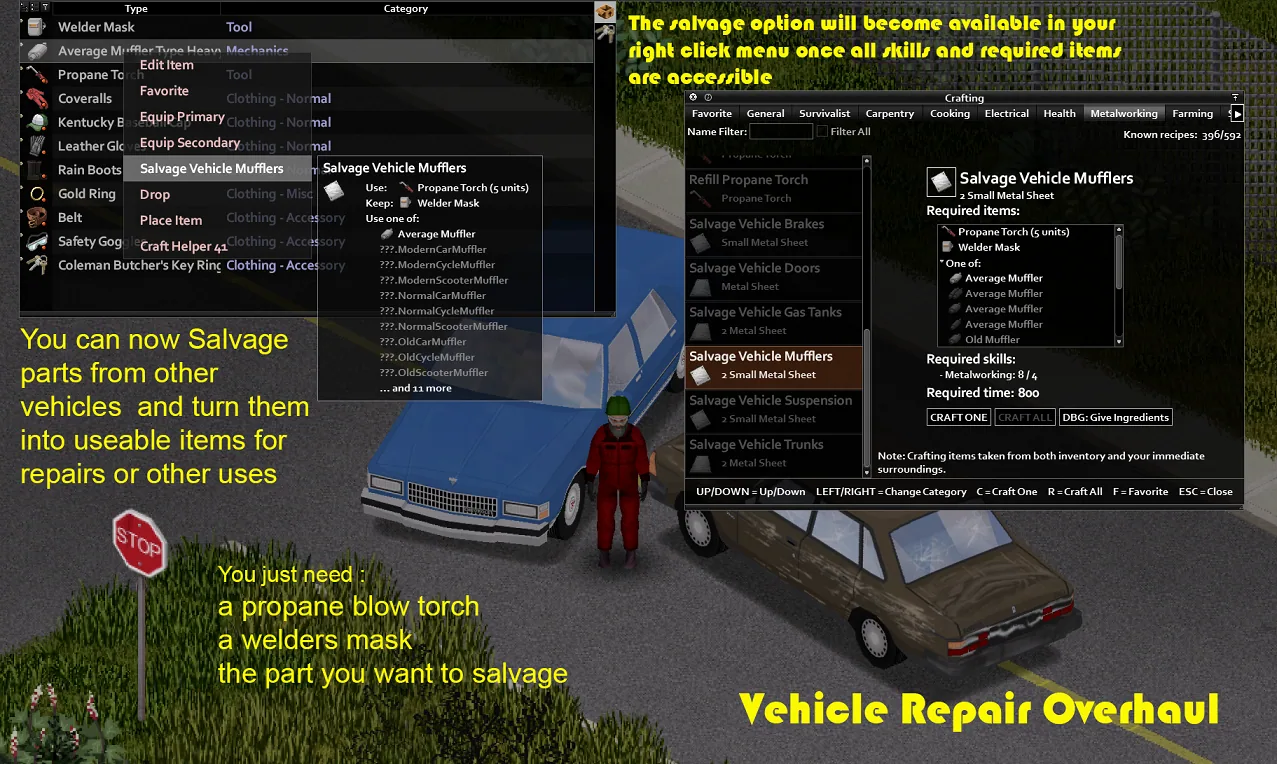
Vehicle Repair Overhaul allows players to dismantle unwanted vehicle parts and recover useful crafting materials.
This creates new opportunities for resource management, especially when supplies are limited.
Instead of leaving damaged components behind, you can recycle them and use the resulting materials to restore other vehicles.
What Materials Can You Recover?
Salvaging results depend on the component being dismantled and your character's skills.
Examples include:
| Vehicle Component | Possible Salvaged Materials |
|---|---|
| Seats | Dirty rags, leather, denim, thread |
| Doors | Metal sheets, small metal sheets, screws, electronic scrap |
| Roof racks | Materials appropriate to the component's construction |
| Other supported parts | Different resources depending on the component |
Each salvaged vehicle part has a chance to produce up to three recovered items.
The quantity and probability of receiving materials depend on Mechanics and Metalworking skills.
This does not mean that every dismantling operation guarantees three items.
How to Salvage Vehicle Parts
Metal components generally require suitable welding equipment, including a blowtorch and welding mask.
To salvage a component:
- Find a vehicle containing unwanted or heavily damaged parts.
- Open the vehicle mechanics interface.
- Remove the component you want to dismantle.
- Prepare the tools required for salvaging that component.
- Select the appropriate salvaging action.
- Wait for the operation to finish.
- Collect the recovered materials.
Requirements vary depending on the component.
For example, old seats can provide fabric materials, while damaged metal doors may yield metal sheets, screws, and electronic scrap.
Why Salvaging Parts Is Useful
Vehicle part recycling becomes particularly valuable when you have access to multiple damaged vehicles.
Instead of attempting to restore every car, you can use one vehicle as a source of materials for another.
This approach allows you to:
- Conserve valuable replacement parts.
- Recover useful supplies without searching additional buildings.
- Restore more valuable vehicles.
- Develop your character's technical skills.
- Make better use of damaged and abandoned cars.
Complete Vehicle Salvaging - Salvage Vehicle
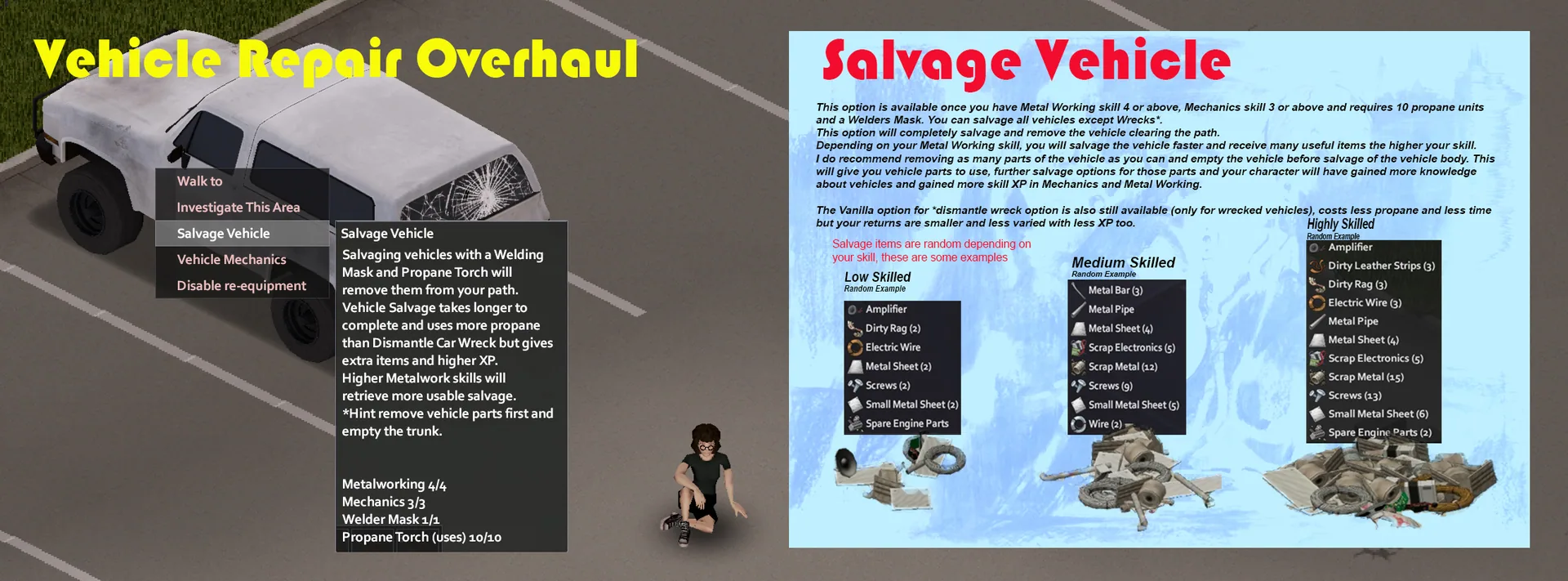
In addition to dismantling individual components, Vehicle Repair Overhaul introduces an option to salvage an entire vehicle.
The feature is called Salvage Vehicle.
It allows players to completely remove a vehicle from the game world while recovering useful materials.
This is particularly useful when a damaged car is beyond practical repair or is blocking a road.
Requirements for Salvage Vehicle
Complete vehicle dismantling requires specific skills, resources, and equipment.
| Requirement | Value |
|---|---|
| Mechanics | Level 3 or higher |
| Metalworking | Level 4 or higher |
| Propane | 10 units |
| Protective equipment | Welder's Mask |
| Main tool | Blowtorch |
| Eligible target | Vehicle not classified as a Wreck |
The Salvage Vehicle feature does not replace the standard method of dismantling wrecks.
Vehicles classified as Wrecks continue to use the game's existing dismantling mechanic.
How to Salvage an Entire Vehicle
Follow these steps:
- Find a vehicle you no longer need.
- Make sure your character has at least level 3 Mechanics.
- Confirm that your Metalworking skill is level 4 or higher.
- Prepare a blowtorch, a welding mask, and sufficient propane.
- Approach the vehicle.
- Right-click the vehicle.
- Select Salvage Vehicle.
- Wait until the dismantling process finishes.
- Collect the recovered materials.
Once the operation is complete, the vehicle is permanently removed from the world.
The cleared space can then be used for driving, construction, or parking other vehicles.
How to Get More Resources From Salvaging
The developers recommend removing valuable vehicle parts before dismantling the entire car.
A more efficient process is:
- Inspect the vehicle and its storage compartments.
- Remove any useful items from the interior and trunk.
- Uninstall working components that might be needed for other vehicles.
- Remove damaged parts that can be recycled.
- Salvage those individual parts for additional materials.
- Finally, use Salvage Vehicle to dismantle the remaining vehicle body.
This allows you to preserve valuable components and gain additional opportunities to develop Mechanics and Metalworking skills.
Higher Metalworking skill levels improve the speed of complete vehicle dismantling and can increase the value of recovered resources.
Salvage Vehicle vs. Dismantle Wreck
Project Zomboid already includes a basic feature for dismantling vehicle wrecks.
However, the two systems serve different purposes.
| Feature | Salvage Vehicle | Dismantle Wreck |
|---|---|---|
| Target | Regular vehicles | Vehicle wrecks |
| System | Vehicle Repair Overhaul | Vanilla game |
| Materials | More varied resources | Smaller selection |
| Skill experience | Additional progression opportunities | Lower experience rewards |
| Speed | Influenced by Metalworking skill | Generally faster |
The vanilla wreck dismantling option remains available.
Vehicle Repair Overhaul expands vehicle recycling rather than completely replacing the existing system.
Compatibility With Custom Vehicle Mods
One of Vehicle Repair Overhaul's strengths is its support for custom vehicles.
The mod is designed to work with both vanilla cars and many community-created vehicles.
Popular vehicle additions used alongside the mod include:
- KI5's Vehicles - a large collection of custom vehicles.
- Cyt Vehicles - additional vehicle models.
- Shark's Vehicles - a variety of custom cars and trucks.
- Tread's Water Tank Trucks - specialized water transport trucks.
- KDOT - additional vehicle-related content.
- Viperel's Vehicle Spare Parts - expanded vehicle spare parts.
Craft Helper Continued can also be useful for exploring crafting recipes and available repair materials.
The developers aim to maintain broad compatibility with Workshop vehicle additions.
However, individual vehicles may require updates or additional compatibility support before every repair feature becomes available.
Build 41 and Build 42 Compatibility
Vehicle Repair Overhaul supports Project Zomboid Build 41 and Build 42, including multiplayer.
However, there are important differences between the two versions.
Build 41 Features
In Build 41, repair and salvaging functionality are included in the main mod.
The complete vehicle salvaging feature can be enabled or disabled through the sandbox settings.
The developers also recommend the following additions for Build 41:
- Easy Heater Repair.
- Easy Lightbar Repair.
These mods provide additional repair functionality for specific vehicle components.
Build 42 Features
In Build 42, the salvaging system has been separated into an optional module called Vehicle Salvage Overhaul.
The main Vehicle Repair Overhaul module provides the expanded repair functionality.
Players who want to salvage entire vehicles can enable the additional module.
The Build 42 version also incorporates updated functionality from:
- Easy Heater Repair.
- Easy Lightbar Repair.
- Easy Engine Rebuild.
As a result, installing separate copies of these mods specifically for their included repair functions is generally unnecessary in Build 42.
Workshop ID and Mod IDs
The following identifiers are used for installation and server configuration:
| Parameter | Value |
|---|---|
| Workshop ID | 2757712197 |
| Main Mod ID | VehicleRepairOverhaul |
| Optional Build 42 Mod ID | VehicleSalvageOverhaulB42 |
VehicleRepairOverhaul is the required main module for both Build 41 and Build 42.
VehicleSalvageOverhaulB42 is an optional module used only in Build 42.
Build 41 players do not need to enable the separate Build 42 salvaging module.
Load Order and Potential Conflicts
For best results, Vehicle Repair Overhaul should be loaded after your other vehicle mods.
The developers recommend placing it near the bottom of the mod load order.
This can help reduce conflicts with modifications that add new vehicles or alter existing components.
Old and New Repair Systems
Vehicle Repair Overhaul includes two repair system options.
The old repair system is designed for broad compatibility with other modifications.
It is disabled by default through sandbox settings.
The new repair system provides updated repair functionality but may conflict with mods that overwrite the following game functions:
ISFixActionISFixVehiclePartAction
One example of a potentially conflicting mod is PM2 - Complete Repair Overhaul.
If vehicle repairs stop working or generate errors, check whether another installed mod changes the same repair actions.
Recommended Load Order Setup
- Load custom vehicle mods first.
- Enable the main Vehicle Repair Overhaul module.
- In Build 42, enable the optional salvaging module if needed.
- Place Vehicle Repair Overhaul after your vehicle additions.
- Review the available sandbox settings.
- Check other repair mods for potential conflicts.
- Restart the game after changing the mod configuration.
If a particular repair action is missing, verify your game version, sandbox settings, and compatibility with the affected vehicle.
How to Install Vehicle Repair Overhaul
The easiest way to install Vehicle Repair Overhaul is through the Steam Workshop.
Installation Instructions
- Open the Vehicle Repair Overhaul Steam Workshop page.
- Subscribe to the mod.
- Wait for Steam to download the required files.
- Launch Project Zomboid.
- Open the Mods menu.
- Find Vehicle Repair Overhaul.
- Enable the main module.
- If you're playing Build 42, enable Vehicle Salvage Overhaul if you want complete vehicle salvaging.
- Place the mod after your vehicle additions in the load order.
- Apply the changes and start your game.
For multiplayer servers, add the appropriate Workshop ID and Mod IDs to the server configuration.
Make sure the server and connecting players are using compatible versions of the mod.
Can You Add or Remove the Mod From Existing Saves?
According to the developers, Vehicle Repair Overhaul is generally safe to add to or remove from existing saves.
However, there is one important exception involving the Fix A Flat item.
If you remove the mod, any existing Fix A Flat items will disappear from your save.
Keep this in mind if you plan to disable the mod after using it for an extended period.
Creating a backup before changing your mod list is recommended, particularly for multiplayer servers or heavily modded saves.
Who Should Use Vehicle Repair Overhaul?
This mod is especially useful for players who enjoy developing technical skills, collecting resources, and restoring damaged vehicles.
It works well with several different playstyles:
- Resource-scarce survival. Restore damaged cars instead of constantly searching for working replacements.
- Mechanic roleplay. Develop vehicle maintenance skills and provide repair services to other survivors.
- Vehicle collecting. Find rare cars and gradually restore them to working condition.
- Multiplayer communities. Establish workshops and divide responsibilities between mechanics and metalworkers.
- Base building. Salvage unwanted vehicles to clear space and recover construction materials.
- Large modded setups. Combine expanded repairs with additional vehicles and vehicle accessories.
Even a car that can no longer be driven may still be valuable as a source of replacement parts and recyclable resources.
Information for Multiplayer Server Owners
Vehicle Repair Overhaul supports multiplayer gameplay in both Build 41 and Build 42.
The developers allow the mod to be included in server modpacks.
This permission helps administrators manage updates and reduce server downtime, especially when the mod receives frequent changes.
However, server administrators are asked to provide proper credit to the mod's creators.
For servers running large vehicle collections, it is worth checking compatibility with other vehicle maintenance systems and testing salvaging before enabling it for everyone.
Technical Information
- Mod name: Vehicle Repair Overhaul
- Game: Project Zomboid
- Supported builds: Build 41, Build 42
- Multiplayer: Supported
- Authors: hehehemann, SP4RTAN
- Workshop ID:
2757712197 - Main Mod ID:
VehicleRepairOverhaul - Optional Mod ID:
VehicleSalvageOverhaulB42 - Category: Vehicles, Repairs, Mechanics, Salvaging
Скриншоты 8

Комментарии 0
Пока нет комментариев — будьте первым.
Войдите или зарегистрируйтесь, чтобы оставить комментарий.